 Claude Codeswarm/quiet-river
BUILT FOR DEVELOPERS
One command center for terminals, agents and servers.
Desktop workspace + mobile companion. Real PTY panes, SSH/SFTP, Control Room collaboration and local token visibility in one native workspace.
Free plan, no account. Notarized by Apple on macOS · Windows: unsigned, SmartScreen warns
Token Meter
Claude CodeWeek resets in 3d 4h CodexWeek resets in 2d 16h
 GeminiResets in 9h
Example values.
Claude Codeswarm/quiet-river
Codexswarm/clear-forest
Gemini CLIswarm/bright-cove
root@prod-web-01SFTP
/var/www/mxterm
NameSizeModified
release.tar.gzUpload
prod-web-01203.0.113.10 · SSH connectedup 41d 6h
9.1%
RAM40%
18%
Keyword-matched Linux command
Interactive demo. Pane output and usage figures are examples.
Works with 27 agent CLIs
Bring the agents you already use.
Each agent's own CLI runs in a real terminal pane. MXterm Pro does not install them: the CLI has to be on your machine.
 Claude Code
 Codex
Codex Gemini CLI
 GitHub Copilot
 Cursor Agent
 OpenCode
 Qwen Code
 Amp
Amp Antigravity
 OMP
OMP Grok
Grok- and 16 more
- Any other CLI in a plain terminal pane
Pricing
Free to start. Pro when the workspace grows.
One purchase, no subscription. Choose how many devices need the full workspace.
Free forever
$0forever
Everyday terminal work with the essential workspace.
- Unlimited terminal panes across all tabs and windows
- SSH and SFTP: up to 5 SSH servers
- Control Room: one room running 2 AI agents
- Git worktree per agent, live agent status and notifications
- Remote control from unlimited phones, iPads and browsers
- Control each pane and tab of your computer from your phone, up to 5 panes at once
- Chat view, File Explorer, Git panel and Token Meter
- Pair by code or QR; temporary access password up to 8 hours
- No subscription
- Command Recipes (Cmd+J)
MXterm Pro
71/100
$29$59one-time · lifetimeSave 51%
First 100 licences, then $8.9/month
Everything in Free, with the limits removed.
Get MXterm Pro - $29 →
MXterm Pro Max - 100 devices for $199 →
Enterprise - Contact sales →
One-time payment · No subscription · 14-day refund
Manage your accountYou already have MXterm Pro.
- Unlimited hosts and connected computers
- Unlimited Control Rooms and members
- Pair every computer and share every pane, tab and computer, with no limit
- My Devices: open your other signed-in Macs, no code or password
- Standing access password, or Temporary up to 7 days
- Early access to exclusive future features
Inside the workspace
The tools you reach for every day.
Each surface is built around a real workflow, from an SSH file browser to several coding agents working side by side.
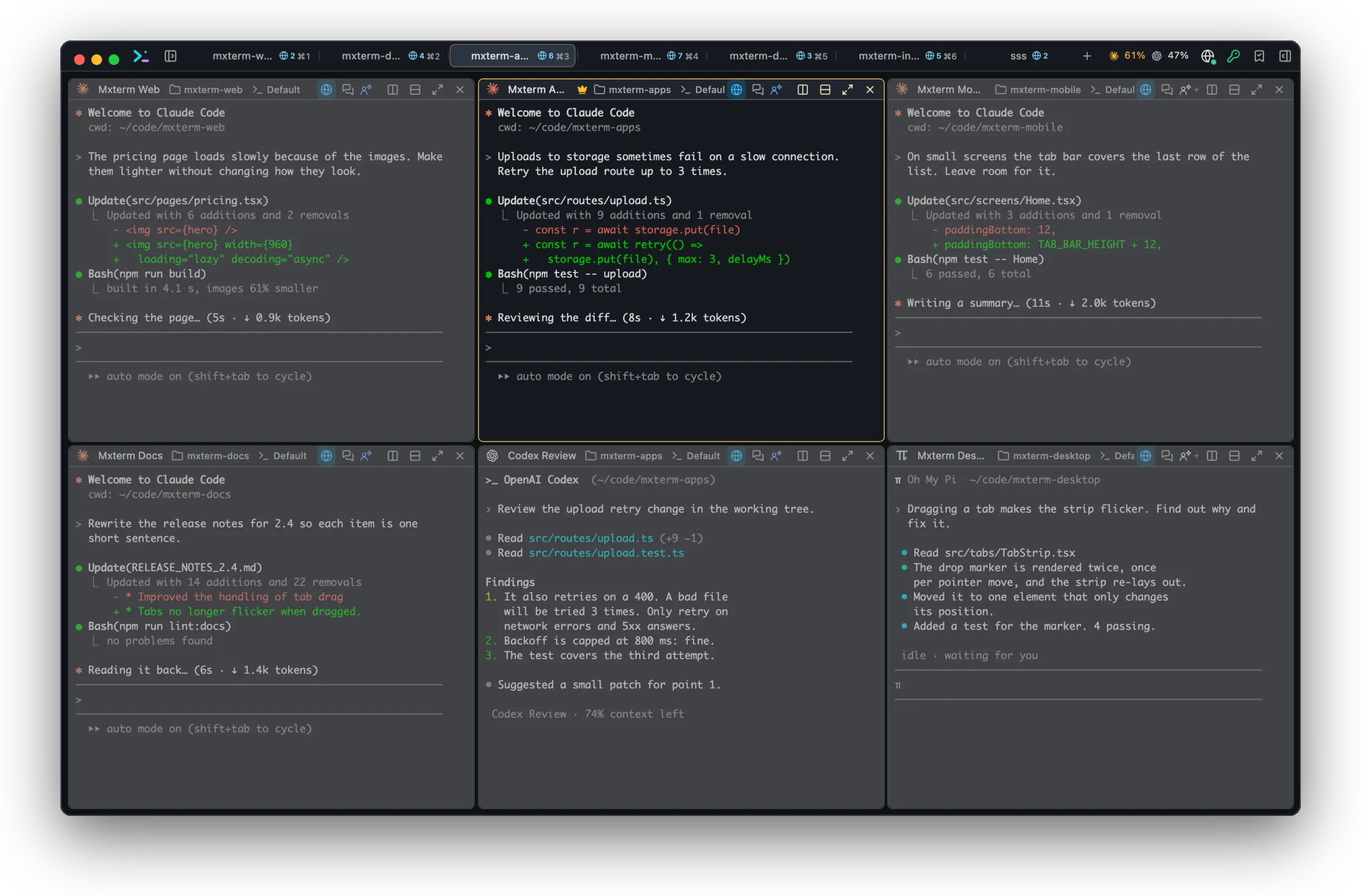
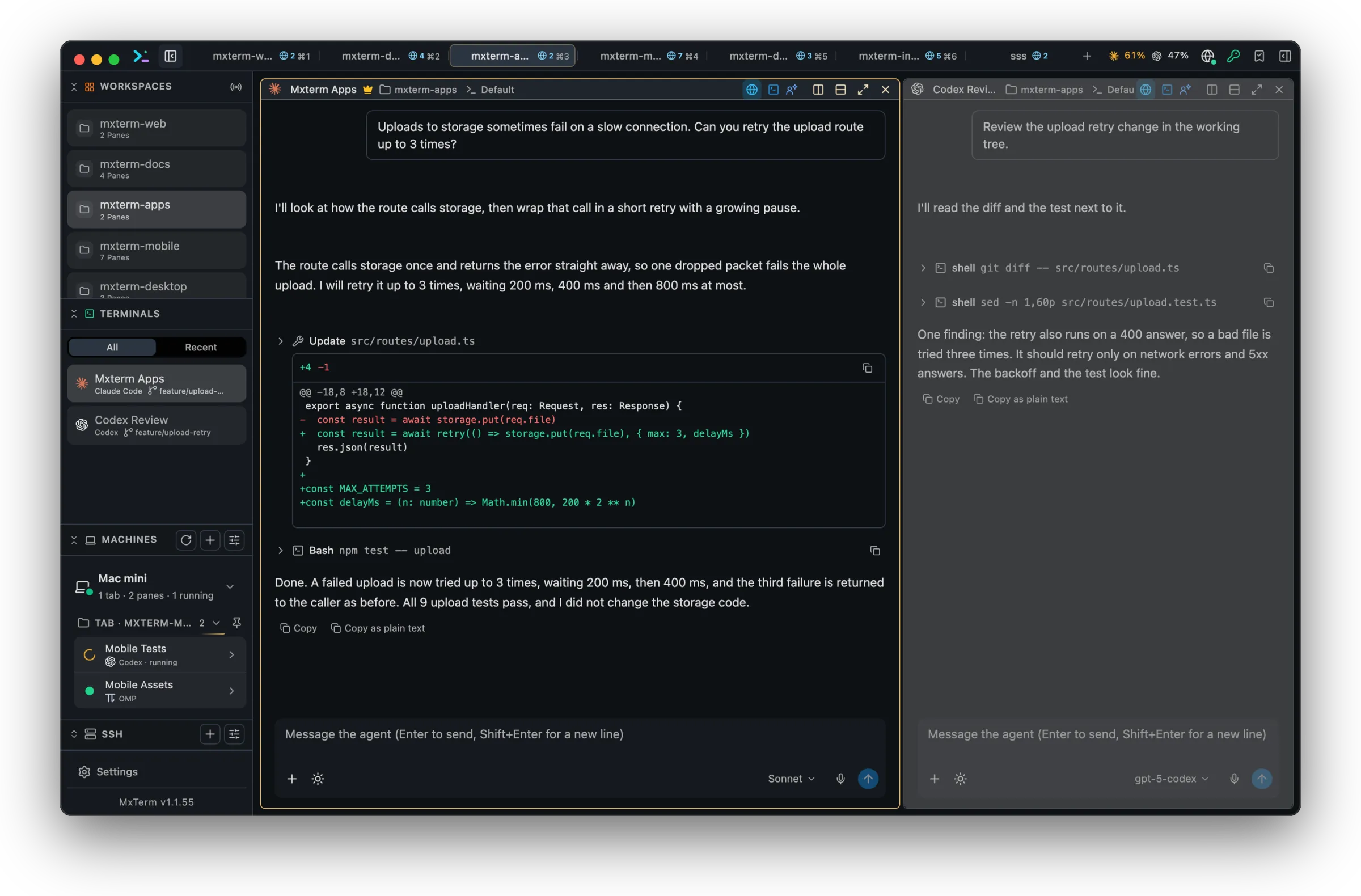
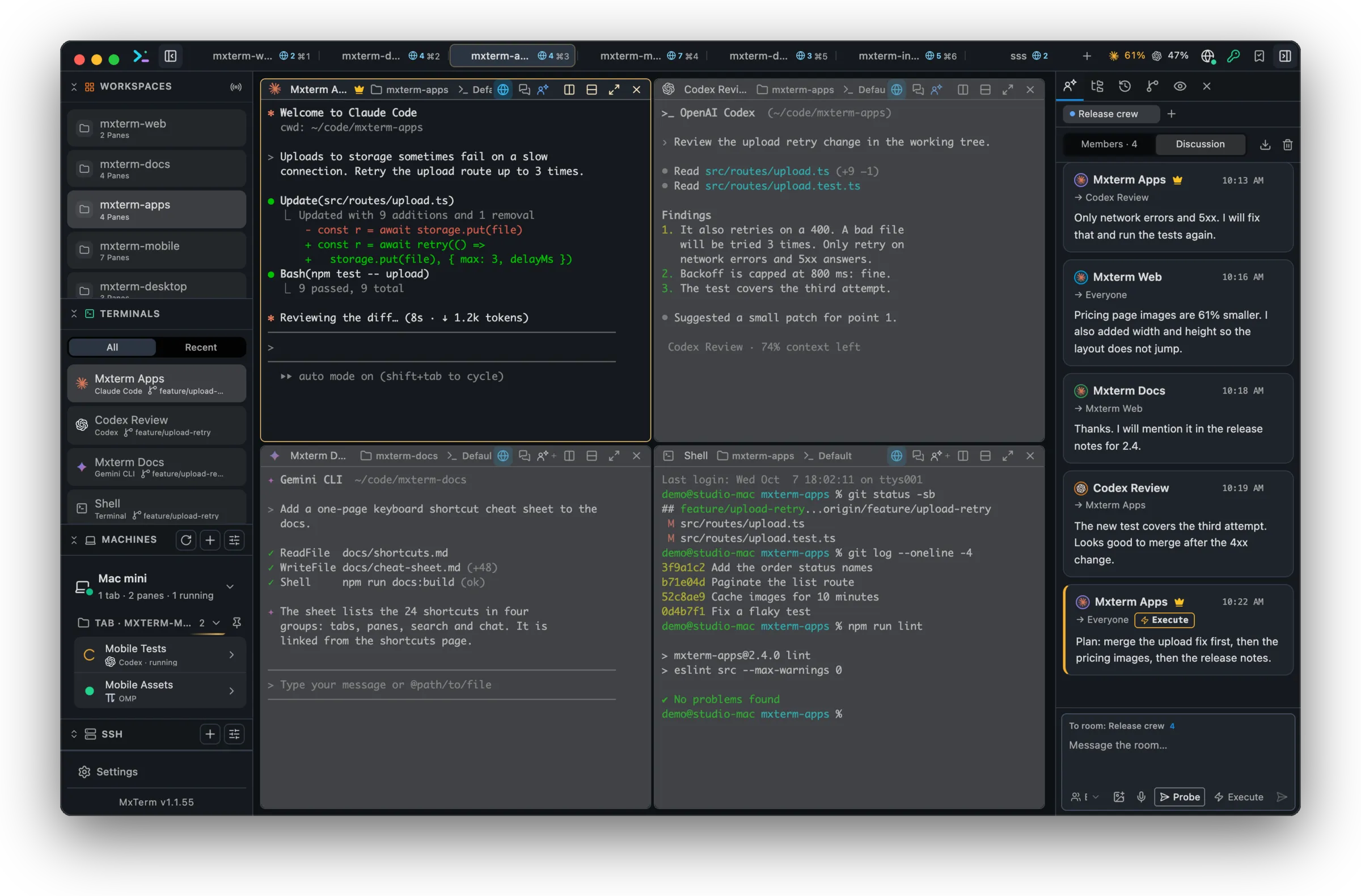
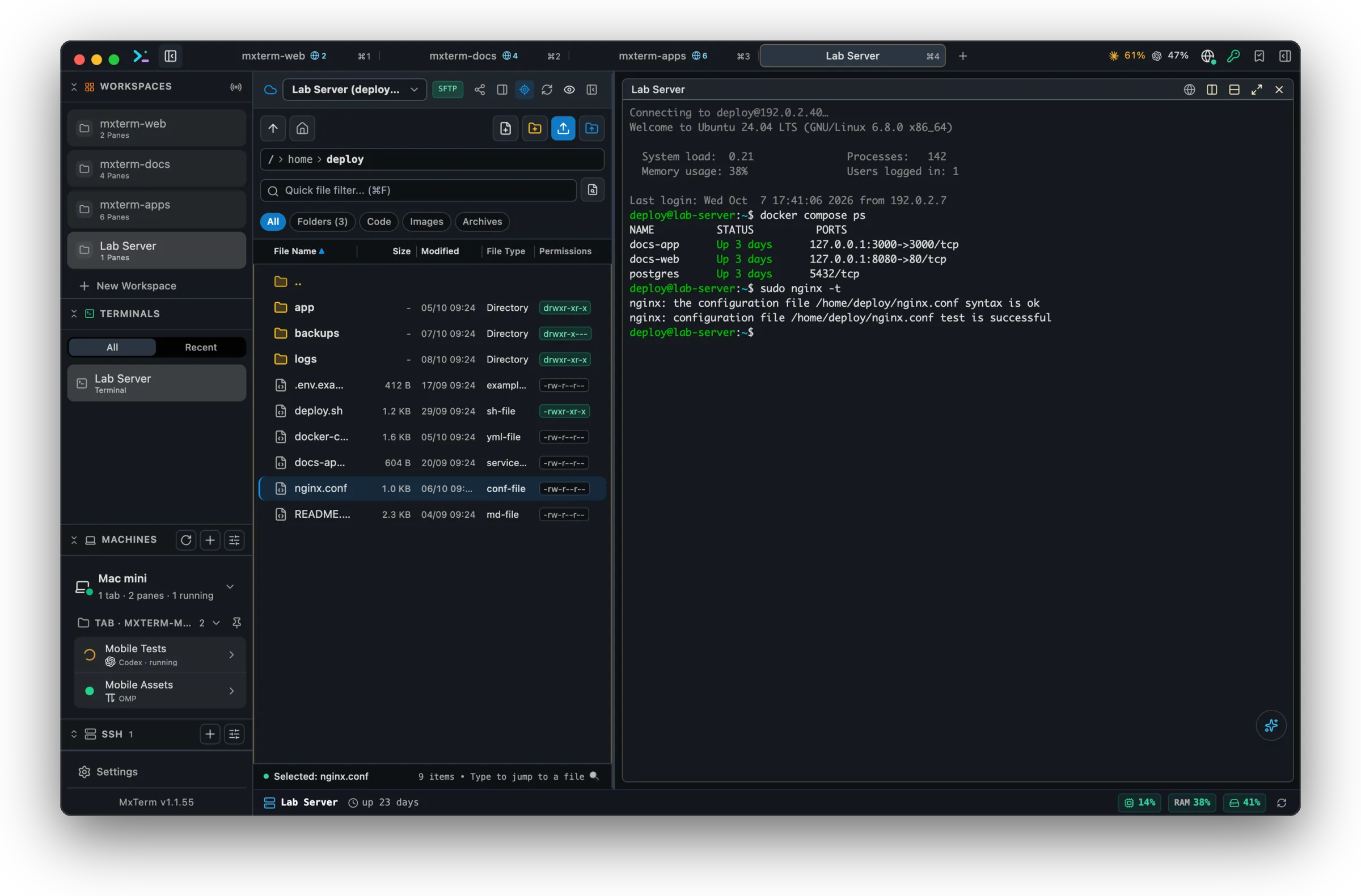
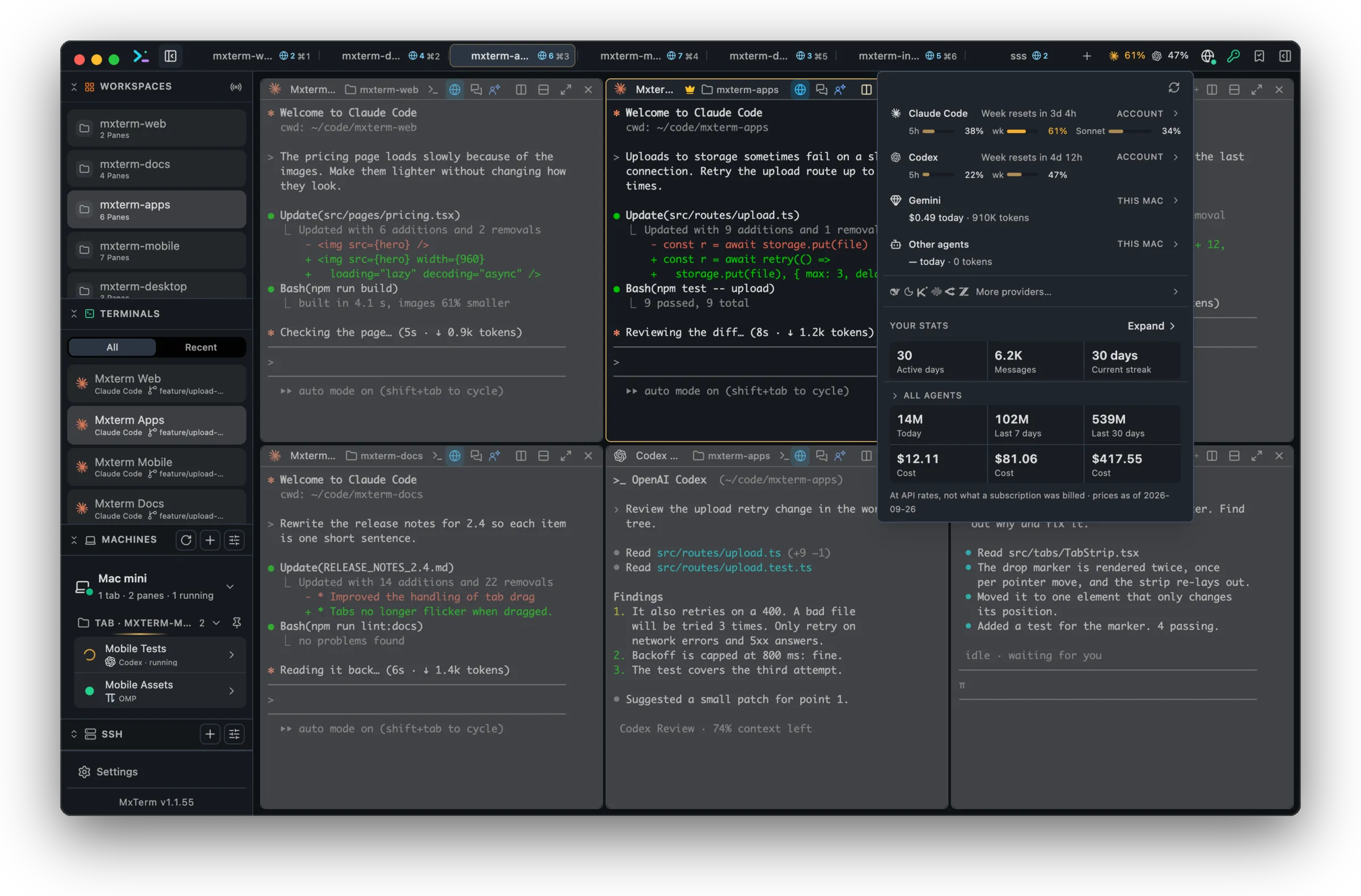
Control Room
Run several coding agents in one Control Room.
Bring Claude Code, Codex, Gemini CLI or Grok into separate panes, watch their state, and optionally give each agent its own Git worktree. Control Room is also known as War Room.
Explore Control RoomSSH & SFTP
A remote file browser that feels at home beside your terminal.
Save SSH hosts, browse remote folders, search files, edit code in the built-in editor, and move files with upload, download and background transfers.
Explore SSH & SFTPReal PTY panes
Real PTY panes, arranged around the work.
Split right or down, move panes between tabs, maximize the pane that matters, and keep multiple live terminal sessions visible in one workspace.
Explore the terminal workspaceToken Meter
Know where your usage stands before the next turn.
Explore Token MeterCommand Recipes
Ready-made Linux commands, one shortcut away.
Press Cmd+J and search by keyword across everyday tasks such as disk, memory, ports, Docker, Nginx and logs. Recipes are fixed local commands, not AI-generated shell.
Explore Command RecipesRemote control
Steer your agents from another machine.
Start the host server on the Mac that runs your agents, share only the panes you choose, and open them from another machine's MXterm Pro or from any browser.
- Share one pane or a whole tab. Off by default. Free shares up to 5 panes at once.
- View only or Control, on a timer you set.
- Pair with a 6-character code. Revoke a device and it is cut off at once.
- Over Tailscale or your local network, on the Free plan.
On your phone
Your agents, in your pocket.
See every agent running on your Mac and reply from anywhere. Pair once with a 6-character code or a QR scan. Until the apps are out, any browser works through the host page.
Why MXterm Pro
More than a terminal. Still focused like one.
Simple terminals leave you stitching together separate SSH managers, file tools and agent windows. MXterm Pro keeps those workflows in one native workspace without pretending to be a remote orchestration platform.
Local-first
Transcripts stay on your machine and the provider keys you add are kept in your OS keychain. License activation and anonymous usage reporting are described in the Privacy Policy.
Developer-first
Keyboard shortcuts, command recipes and app-native pane controls remain central.
What it does not do
It is not a dual-pane SFTP sync tool, a fleet manager or a voice assistant. Token Meter shows plan limits for Claude Code and Codex, and balances for the providers whose API key you add.
Compare
How MXterm Pro compares.
Checked against each product's own pages in September 2026. Each one does some jobs better, and the full comparisons say which.
| Feature | MXterm Pro | MobaXterm | iTerm2 | Termius |
|---|---|---|---|---|
| Platforms | macOS and Windows x64 | Windows | macOS | macOS, Windows, Linux, iOS, Android |
| Price | Free plan; Pro is a one-time purchase from $29 | Free Home edition; paid Professional edition | Free, GPL v2 | Free Starter plan; Pro is $10 per month billed annually |
| Several AI agents in one workspace | Control Room, with a git worktree per agent | Not listed on its features page | Orchestration chats inside its AI Chat | Not listed on its pricing page |
| SFTP | A panel beside the SSH tab, with an editor | A browser in the sidebar, drag and drop | Through shell integration | In the free Starter plan |
| Where it is stronger | Agents and servers in one native window | X11 server, RDP and VNC, serial, macros | tmux integration, Python API, triggers | Cloud sync, mobile apps, a team vault |
| Full comparison | MobaXterm vs MXterm Pro | iTerm2 vs MXterm Pro | Termius vs MXterm Pro |
Get started
Up and running in three steps.
No account and no card for the Free plan.
Download
Get the .dmg for macOS or the installer for Windows from the download page.
Install and open
On macOS, drag MXterm Pro to Applications; the app is notarized by Apple. On Windows, the installer is not code-signed yet, so SmartScreen asks you to confirm on the first run.
Open your first workspace
Pick a folder, split panes and start Claude Code, Codex or Gemini CLI in them. The agent CLIs must already be installed on your machine.
FAQ
Questions developers ask before switching.
What is included in the free plan?
The core terminal, SFTP, Token Meter, local editing and Command Recipes are available from day one. Pro removes the limits on saved SSH hosts, Machines, Control Room members, paired computers and shared panes, and adds My Devices (open your other signed-in Macs with no code or password) and the Standing access password.
Is MXterm Pro a remote server control plane?
No. It is a native terminal workspace with SSH/SFTP and agent collaboration. Remote control lets you steer the panes you share from another machine; it does not manage a fleet of servers.
Does SFTP sync a local and remote folder?
No. SFTP is a single remote browser with transfers, editor, search and chmod tools.
Does MXterm Pro run on Windows?
Yes, as a Windows 10 or 11 x64 build. The installer is not code-signed yet, so SmartScreen warns on the first run. Some features are macOS only, such as Claude plan limits in the Token Meter.
Do I need to install the AI agents myself?
Yes. MXterm Pro runs each agent's own CLI in a terminal pane and does not install them. Claude Code, Codex, Gemini CLI and the others must already be on your machine.
Is Pro a subscription?
No. Pro is a one-time purchase from $29 for 3 devices, with a 14-day refund. Mac and Windows devices count together.
What are the Free limits for remote control?
Remote control works on the Free plan. By default Free saves 1 Machine, connects 2 computers (this one and one other) and any number of phones, shares up to 5 panes at once, and allows a temporary access password of up to 8 hours. Pro removes all of these limits and adds My Devices (open your other signed-in Macs with no code or password) and a Standing access password with no time limit; its temporary password lasts up to 7 days. The 6-character pairing code works on every plan.
Can I watch my agents from my phone?
Yes, in any browser today: start Remote Access on the computer, pair with the code and open a shared pane. A native app for Android and iPhone is in testing, and the download page lists what is ready. iPad and Apple Watch are next.
How does Control Room collaboration work?
Connected agents share room discussion. You can address everyone or a member, Probe or Execute, and export the discussion as Markdown.
Ask AI about MXterm Pro
Open a live answer in ChatGPT, Claude or Perplexity, based on this page. The assistant writes it, not us, so check the sources it cites.
Question sentWhat is MXterm Pro, and what kind of developer is it built for?
 Ask Claude
Open your first workspace today.
Download for macOS or Windows. The Free plan needs no account and no card.