Token Meter: Claude Code and Codex Token Usage, Plus Your API Account Balances and Quotas
With Claude Code, Codex, Gemini CLI and omp running side by side, MXterm Pro's Token Meter answers one question: which agent is burning tokens right now? It sits in the title bar as one figure, and opens to each agent's tokens used in the last 5 hours and the last 7 days, read from the transcripts they already keep on your machine. Paste an API key and it can also show what six other providers report for your account.
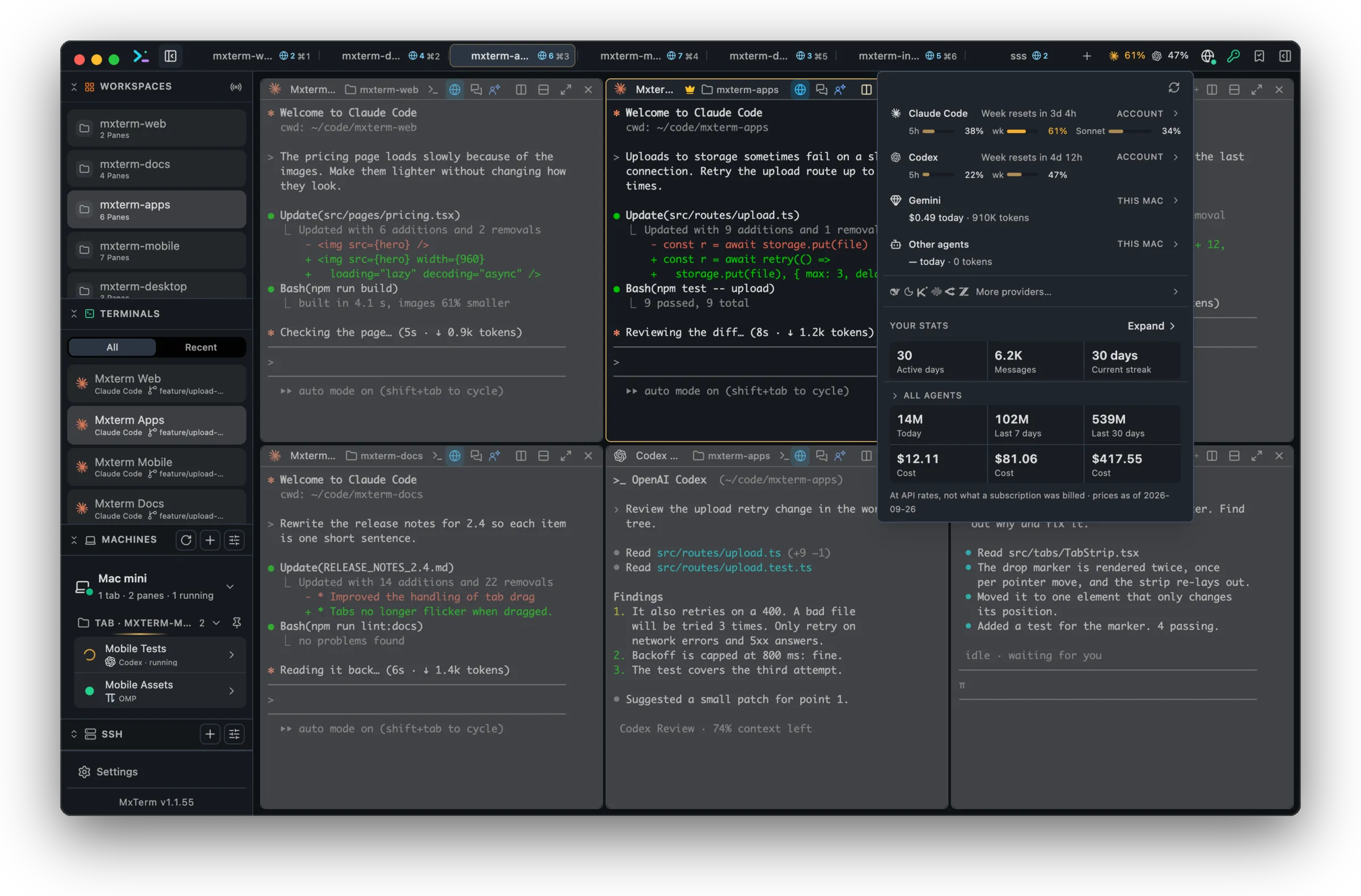
From local transcripts: no key
From your account: one API key each
Illustrative, not a screenshot. An agent appears only once it has run on this Mac; a provider only if you saved its key.
One figure in the title bar
The bar carries a single number. The most constrained quota across everything it can see, coloured by how close it is. With no quota anywhere it falls back to tokens used in the last 5 hours (Claude Code's, or Codex's when Claude Code isn't there), and with only account balances it shows the lowest USD balance as money. Click it for one row per provider you have set up, with one provider listed first (Claude Code by default, changeable in Settings, then Token Meter); providers you have not set up are listed after them, and from two upwards fold under a More providers toggle. Open a row for that agent's 24-hour sparkline, its 7-day breakdown and a 30-day chart.
Cache reads, counted apart
On a long session most tokens are cache reads, and lumping them in makes the session look far bigger than it is. So the 7-day breakdown lists fresh input, output, cache writes and cache reads separately, plus the number of turns.
Read from your own disk
Claude Code, Codex, Gemini CLI and omp already write a transcript of every turn on your machine. Token Meter reads those files for its token counts: no API key, no account, and the transcripts are never sent anywhere. An agent that has never run on this Mac doesn't appear, and with none of them run and no account key saved the meter stays hidden.
Three different numbers, kept apart
Tokens used is what the popover shows out of the box: counts already written to disk by Claude Code, Codex, Gemini CLI and omp, and what the title bar falls back to when no quota is known. The popover also puts a cost beside them, priced at published API rates. Not what a subscription was billed, and a floor rather than a total when a model has no published rate.
Plan limits are percentages of a ceiling, and your transcripts cannot say where you stand against one. Codex is the exception: it writes the server's own 5-hour and weekly percentages into its session files, so those are read from disk with no network call and no credential. As fresh as your last Codex turn. Everything else here is a switch you turn on.
Account balance is money or quota sitting with a provider, and it is not a plan limit or a token count. A balance and a spend figure are never turned into a percentage. A balance reaches the title bar only when there is no quota and no local agent, and then as the lowest USD balance in money.
Three opt-ins stay off until you switch them on
Three opt-ins, each off until you turn it on, each in Settings → Token Meter. Your transcripts are not sent by any of them.
Claude plan limits
Turn on “Show real limit percentages for Claude” and MXterm Pro reads Claude Code's saved sign-in from your Keychain through the macOS security tool, which normally shows no prompt. The app then calls api.anthropic.com for your plan usage. If macOS refuses the read, it stays off until you switch it on again. This works on macOS only; on Windows the app cannot read Claude Code's sign-in.
Live Codex limits
Off, Codex limits come from its session files on this Mac. On, MXterm Pro reads Codex's sign-in from ~/.codex/auth.json and sends it to chatgpt.com only, for your current 5-hour and weekly limits. It never changes or refreshes that sign-in, and an expired token is not sent at all: you are told to run codex once instead.
Account providers
Six providers, one at a time, each entirely inert until you paste that provider's API key into its row: DeepSeek and Moonshot report an account balance; Kimi, MiniMax and Z.ai report a coding-plan quota percentage; OpenRouter reports the key's spending limit, or what the key has spent when it has no limit. Moonshot, MiniMax and Z.ai also have a region setting (International or Global by default), because a key only works in its own. And it is only ever sent to that region's host, except that a MiniMax key rejected on the global host is also tried on the CN host. Not every provider's reader has been checked against a live account yet.
Keys go into the macOS Keychain under the service MXterm Pro, one item per provider, named account-usage.deepseek, account-usage.moonshot and so on. They are MXterm Pro's own items, so macOS does not normally put up a dialog for them. A small file beside them records only whether a key is saved, its last four characters and its region. On Windows the app uses Windows Credential Manager instead, which is not verified.
Each key goes to that one provider's endpoint and nowhere else, at most once every five minutes; a rate-limit reply parks that provider for fifteen, and a rejected key is not retried until you change it. With nothing set up there is no timer, no Keychain read and no request. Kimi is the one exception to pasting a key: with no key saved it will read the Kimi Code CLI's own token from ~/.kimi-code/credentials/kimi-code.json, which it reads but never writes and never refreshes.
Related: Claude Code and Codex token usage · Token Meter docs
See which agent is burning tokens
Included in the download. Once Claude Code, Codex, Gemini CLI or omp has run on your Mac, it appears in the title bar on its own; account providers wait for a key.
Ask AI about MXterm Pro
Open a live answer in ChatGPT, Claude or Perplexity, based on this page. The assistant writes it, not us, so check the sources it cites.
Question sentWhat does the Token Meter show for Claude Code and Codex, and which parts are opt-in?