Claude Code and Codex Token Usage: What the Token Meter Reads
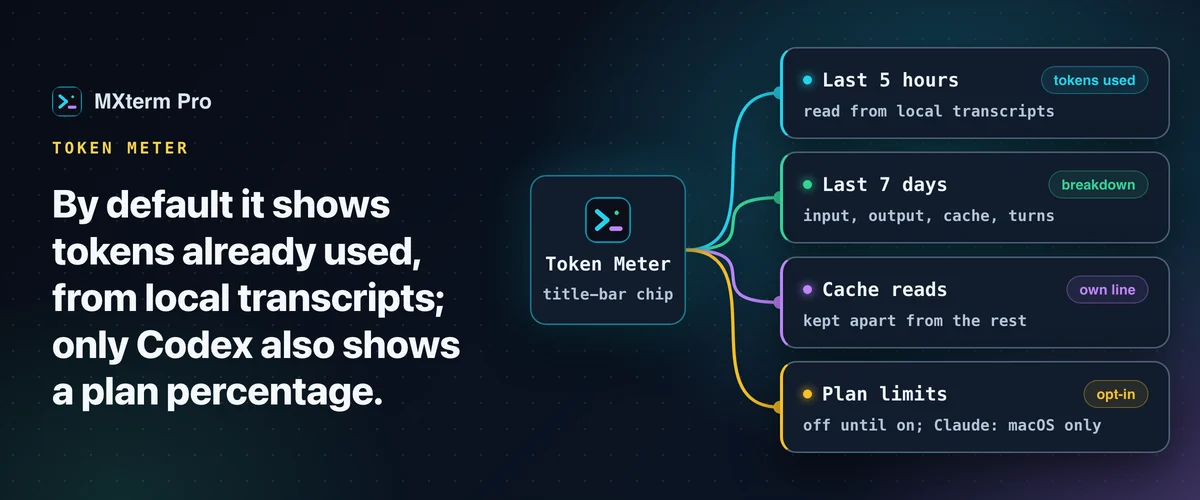
Claude Code token usage appears in MXterm Pro's Token Meter (added 1.0.19). It reads Claude Code, Codex, Gemini CLI and omp transcripts and reports tokens over the last 5 hours and 7 days. By default that's spend, not a plan percentage, except Codex, whose files carry one, as fresh as your last turn. Opt-in switches add Claude limits (1.0.21, macOS only), Codex limits and account balances (1.0.22).
What the Token Meter Shows
Once an installed agent or a saved account key gives it something to show, the Token Meter sits in the right-hand group of title-bar buttons and stays there while the app is open, so you don't have to open a panel to find it.
The bar carries a single figure: the most constrained quota anywhere, colored by how close it is. If nothing you've configured publishes a quota, the chip shows the 5-hour token total of Claude Code, or of Codex when Claude Code isn't installed. With no agent installed and only account balances, it shows the lowest USD balance.
Click it for a summary. Every provider you have set up gets one two-line row: its name and the reset clock that matters on the first line, and on the second its 5-hour and weekly bars where a limit is known, or today's spend and tokens where none is. The provider you pin in Settings → Token Meter is listed first (Claude Code unless you change it, or none).
Open a row for that agent's full detail. It lists tokens used in the last 5 hours and the last 7 days, abbreviated with K, M or B, plus a sparkline of the last 24 hours with one bar per hour. Cost tiles show today's and the last 7 days' estimated cost at API rates, with the date the price table was last updated.
The 7-day breakdown covers fresh input, output, cache writes, cache reads, and the number of turns. The numbers refresh in the background about once a minute.
An agent only shows up if it's installed, meaning its transcript folder exists. With no local agent and no account key saved, the meter renders nothing at all rather than an empty gauge. A gauge reading zero claims you've used nothing, which isn't the same as not knowing.
Related guideOrchestrating Parallel AI Agents in Split Terminal PanesWhich Agents the Token Meter Reads From Disk
For the token counts, Token Meter has one source: the transcript each agent keeps on your disk. Claude Code, Codex, Gemini CLI and omp record the token counts for every turn in theirs. The meter doesn't call a provider's API or ask you to sign in. There's no API key to paste and no account to connect, and for the token counts nothing is sent anywhere.
The list is four names long because the meter reads the transcript folders of Claude Code, Codex, Gemini CLI and omp. It does not read OpenCode, so it shows nothing for it rather than a guess.
1.0.22 added a second, separate source that isn't transcripts. Paste an API key in Settings → Token Meter for any of six account providers and each gets its own row, showing what that provider reports from its own endpoint: a balance, a plan quota or spend. That's a different measurement with different caveats. Read the difference between usage and balance before you treat any of these numbers as interchangeable.
Why Cache Reads Get Their Own Line
Most tokens in a long agent session are cache reads: context the agent has already sent, served back from the provider's cache on each new turn. Counted together with everything else, they make a session look far bigger than it is.
Given their own line, cache reads stay out of the way, and you can see what the rest of the session actually came to.
What It Won't Show
By default Token Meter reports spend: tokens already used. It doesn't predict how much more you can run. Claude Code's transcripts don't record where a subscription stands, so a Claude percentage needs another source. Codex's session files carry its rate-limit readings, but only as fresh as your last Codex turn. Two opt-in switches now provide a live figure for each.
For Claude, 1.0.21 added Plan limits, which work on macOS only. Turn it on in Settings → Token Meter. The app then reads Claude Code's saved sign-in from your macOS Keychain through the system security tool, so macOS does not ask each time. It fetches your real plan usage from api.anthropic.com, at most once every five minutes.
For Codex, 1.0.22 added Live Codex limits. It reads Codex's ChatGPT sign-in from ~/.codex/auth.json and sends it only to chatgpt.com to fetch the current 5-hour and weekly windows.
It is designed only to read that file. An expired token makes no request and asks you to run codex. A sign-in kept in the system keychain instead is not read at all. Both switches are off until you turn them on.
Codex is the one that has a number even with that switch off. Its own CLI writes the plan's rate-limit readings into its session files, so the meter reads them from the same lines it already scans. That reading is only as fresh as your last Codex turn, which is the reason the live switch exists.
The 5-hour and 7-day figures are windows that look back from the current moment. "Used in the last 5 hours" is exactly what the number means. It says nothing about what your plan allows.
Who It's For
Token Meter is built for running Claude Code and Codex side by side, in split panes or together in a Control Room (formerly War Room). It shows which one is eating tokens without switching into either CLI to ask. If you run a single agent now and then, you won't learn much from it. See also the Token Meter page and the Token Meter docs.
Multi-pane SSH, Command Recipes (Cmd+J), and a multi-agent Control Room (formerly War Room): free to start.
Already have MXterm Pro? Read the setup guide →
New to MXterm Pro? See pricing →
Frequently Asked Questions
It arrived in 1.0.19 and has been extended since: 1.0.21 added Claude plan limits, and 1.0.22 added live Codex limits and account providers. There's nothing to turn on for the token counts. On macOS, with Claude Code or Codex installed, the meter appears in the title bar by itself; this hasn't been verified on Windows.
Click the meter in the title bar and open Claude Code's row. It shows tokens used in the last 5 hours and 7 days, plus a 24-hour sparkline with one bar per hour. Cost tiles show estimated cost at API rates, with the date the price table was last updated. A 7-day breakdown covers fresh input, output, cache writes, cache reads and turns. Codex gets the same when it's installed.
Claude Code, Codex, Gemini CLI and omp, each only if it's installed. Their token counts are read off disk: the meter scans their transcript folders and does not read OpenCode. Separately, 1.0.22 lets you add six account providers as account rows by pasting an API key. Those report a balance, a plan quota or spend, not tokens from a transcript.
For Claude, only if you enable it. Codex shows one from its session files even with the switch off. Plan limits (macOS only) in Settings → Token Meter shows real percentages of your Claude plan from api.anthropic.com, using Claude Code's saved sign-in read through the system security tool, so macOS does not ask. Live Codex limits fetches Codex's figure fresh through chatgpt.com. Both are off by default.
Not for token counts. Those come from the transcripts Claude Code and Codex already write on your machine, with no API key or account, and the transcripts stay local. The opt-in switches send only a sign-in or key to the named provider. Claude plan limits contacts api.anthropic.com, live Codex limits contacts chatgpt.com, and an account provider's key goes only to that provider's own endpoint.
On a long session most tokens are cache reads, and adding them to everything else makes the session look far bigger than it is. A separate line shows what the rest of the session came to.