Check AI API Credit Balance Without Opening Five Dashboards
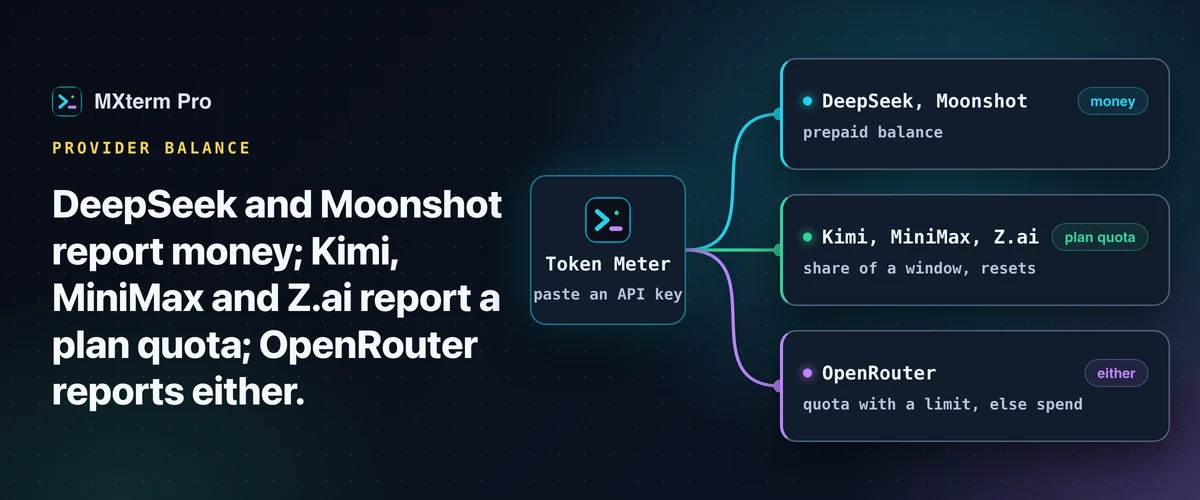
To check your AI API credit balance, you first need to know which number each provider reports. DeepSeek and Moonshot report money. Kimi, MiniMax and Z.ai report a plan quota, a percentage of a window. OpenRouter reports either, depending on whether the key has a spending limit. This covers which endpoints you can call yourself and how MXterm Pro's Token Meter reads all six, refusals included.
Three Different Questions Behind One Word
"Credit" covers three things that behave nothing alike, and mixing them up is how people get surprised mid-task.
A prepaid balance is money you've already paid in, drawn down per request. It has no reset: it only goes down until you top it up. DeepSeek and Moonshot work this way.
A plan quota is a share of a window: a coding plan that gives you so much per 5 hours, per week or per month, and refills when the window rolls over. Kimi Code, MiniMax's coding plan and Z.ai's GLM coding plan work this way.
A percentage here means something different from a percentage of a balance. If a window resets Sunday night, being at 90% on Monday at 09:00 is a much worse position than at 90% on Sunday at 17:00, because the reset is almost a week away instead of hours.
Spend is simply what a key has cost so far, with no ceiling attached. It's the plain answer when there is no limit to be a share of, which is exactly what OpenRouter hits with an uncapped key.
What Each Provider Actually Exposes
DeepSeek publishes GET https://api.deepseek.com/user/balance, authorized with an ordinary API key as a bearer token. It returns balance_infos[], one row per currency.
Each row carries total_balance (what you can actually spend), topped_up_balance (credit you paid for) and granted_balance (promotional credit), as decimal strings in whole currency units. The paid and granted split matters, because granted credit is usually what expires first.
Moonshot (the Kimi Open Platform) answers GET /v1/users/me/balance on api.moonshot.ai internationally and api.moonshot.cn for the China platform. It returns available_balance alongside cash_balance and voucher_balance. A key belongs to one platform and will not work against the other.
One caveat before you build anything on it: the response carries no currency field at all. The currency is inferred from which host answered, CNY for the China host and USD otherwise. That is an inference, not something the server states.
Kimi Code is a subscription, not a wallet. GET https://api.kimi.com/coding/v1/usages returns a 7-day usage quota plus shorter rate-limit windows. The monthly "Total usage" pool on Kimi's own site comes from a different, cookie-authenticated web endpoint, so an API key alone doesn't get you that figure.
MiniMax uses a coding-plan key that starts with sk-cp-. It calls GET /v1/token_plan/remains on api.minimax.io globally or api.minimaxi.com for the China platform. An older /v1/api/openplatform/coding_plan/remains path still answers for some accounts. What comes back is remaining plan capacity per window, not money.
OpenRouter has a documented, first-class endpoint for this: GET https://openrouter.ai/api/v1/key returns the calling key's own limit, limit_remaining and usage, all in USD. If the key has a spending limit, you get a real percentage.
Z.ai (and BigModel, its China platform) exposes coding-plan quota at /api/monitor/usage/quota/limit on api.z.ai or open.bigmodel.cn. This endpoint isn't in Z.ai's published API reference. It's the one Z.ai's own open-source usage plugin calls, so it is vendor-published client code rather than a promised interface, and it can change without notice.
Its payload also mixes two different pools: the plan's token or credit quota, and a separate monthly quota counting MCP tool calls like web search. Those are not interchangeable. Reading the second as the first is an easy way to think your plan is nearly gone when it isn't.
Related guideUsage, Plan Limit, and Balance: Three Numbers People Keep ConfusingReading Them Yourself
For a couple of them you don't need any tool at all. Both are plain GETs with a bearer token. curl -H "Authorization: Bearer $DEEPSEEK_API_KEY" https://api.deepseek.com/user/balance gets you DeepSeek's figure, and curl -H "Authorization: Bearer $OPENROUTER_API_KEY" https://openrouter.ai/api/v1/key gets you OpenRouter's.
Pipe either through jq and you have a shell function you can bind to an alias in about a minute. That's a good answer for one or two providers.
It stops scaling at the operational part. Each key has to live somewhere your shell can read it, usually a dotfile or an exported environment variable. You have to remember to run it, and the answer is only as current as the last time you did. For providers whose endpoints aren't documented, you're also maintaining a scrape against something that can change without a changelog entry.
The other free option is each vendor's own dashboard. It is always the authoritative number, and it shows what an API key cannot: invoices, expiry dates on granted credit, per-key breakdowns. It's the right place for a monthly reconciliation.
It's a poor fit for "am I about to run out mid-task", which you ask ten times a day and want answered without leaving what you're doing.
What MXterm Pro's Token Meter Does With Them
All six were added to the Token Meter in 1.0.22. In Settings → Token Meter there's a row per provider.
Paste an API key and pick a region where the provider has one (Moonshot international/China, MiniMax global/China, Z.ai global/China; Moonshot and Z.ai keys only work in their own). That provider then joins the popover with its balance, its quota windows or its spend figure, refreshed in the background. The popover lists every provider you set up, and Settings → Token Meter lets you pin one to the top (Claude Code by default). See also the Token Meter page and the Token Meter docs.
The one chip in the title bar shows the single most constrained quota anywhere, colored by how close it is. For the reason given in the first section, a balance or a spend figure never counts as a percentage or becomes a bar. With no quota and no Claude Code or Codex installed, the chip shows the lowest USD balance as money.
Each row says how old its reading is, and what went wrong: rejected key, provider unreachable, rate limited, or a reply that couldn't be read. If the provider is unreachable or rate limits the check, the row keeps the last good reading and says it is stale rather than passing an old number off as current. A rejected key or an unreadable reply shows that message instead.
Where the Keys Live, and What Never Leaves
Here are the specifics, because "we store it securely" is not a claim anyone can check.
A pasted key goes into your operating system's own credential store. On macOS, that is a Keychain item MXterm created itself, under service MXterm Pro and account account-usage.<provider>. The Windows build is set up to use the Windows credential store, but that is unverified there. In the current build it is not written into the app's own files or into browser storage.
The input you paste into is uncontrolled on purpose. The key lives in that DOM input and nowhere else until Save hands it to the backend, which then empties the field. The app's state does not hold it.
A second, non-secret file in the app data directory, account-usage.json, remembers only three things per provider: whether a key is saved, its last four characters and the region. The title bar consults it on every load, so the app can know what you've configured without a single credential-store call. With nothing configured, the Token Meter makes no credential-store call and no network call at all.
In the current build each key goes only to hard-coded HTTPS hosts of the provider it belongs to. Redirects are not followed, so a bearer token cannot be bounced to another host. There's no user-settable base URL to point a key somewhere else.
Error text is a fixed category, not a raw response: "invalid credentials", "unreachable", "unreadable" or "rate limited". Every type holding a secret prints [redacted] when debugged. The only part of a saved key the app displays is … plus its last four characters, and only when it's long enough that four characters give nothing away.
What It Deliberately Doesn't Do
A meter that reads credentials should be judged on its refusals as much as its features. These were made explicitly.
No management keys. An OpenRouter reply that says it came from a management or provisioning key is refused as invalid, because those keys can create and delete API keys. The app also never calls the account-credits endpoint, which is management-key-only.
No browser cookies, and no other app's stored credentials. The only credentials read are the ones you pasted and, for Kimi alone, the Kimi Code CLI's own token file: read, never written, never refreshed, because it belongs to the CLI.
Some tools create a device-id file when it's missing. MXterm doesn't, because it won't write into another program's directory. If that file isn't there, the CLI path is simply unavailable and the provider reads as not configured.
No hammering. Each provider is asked at most once every five minutes. A 429 parks it for fifteen. A 401 or 403 parks it until you change the credential, instead of retrying a rejected key on a timer. The app's own polling only runs while at least one provider is configured: a saved key, or the Kimi Code CLI's credential files.
Its own identity, with one exception. The app identifies itself with a User-Agent naming MXterm and its version. MiniMax's source header carries MXterm's own name, and OpenRouter gets no attribution header at all.
The exception is the Kimi Code CLI path. There the CLI's own token is sent with the CLI's platform identity (X-Msh-Platform: kimi_code_cli) and its device id, alongside MXterm's version.
The Caveat Worth Stating Plainly
MXterm Pro's parsing was written and tested against fixtures and doc examples, not against captured live replies from every provider.
So if a provider renames a field the parser needs, the row shows "couldn't read the reply" instead of a wrong number. That is the failure mode you want. Still, don't treat any of this as an accounting source.
For money that has to be right (an invoice, a budget, a chargeback), go to the vendor's dashboard. For "is this key about to run dry while three agents are running", a list that updates itself in the corner of the window is the better tool.
Multi-pane SSH, Command Recipes (Cmd+J), and a multi-agent Control Room (formerly War Room): free to start.
Already have MXterm Pro? Read the setup guide →
New to MXterm Pro? See pricing →
Frequently Asked Questions
Six: DeepSeek, Moonshot, Kimi, MiniMax, OpenRouter and Z.ai, each from an API key you paste in Settings → Token Meter. DeepSeek and Moonshot report a money balance. Kimi, MiniMax and Z.ai report plan quota windows. OpenRouter reports a quota if the key has a spending limit, or its spend if it doesn't. Claude Code and Codex are read separately, from their own transcripts on your machine.
Your operating system's credential store. On macOS, that's a Keychain item under the service name "MXterm Pro". Windows is set up for its own credential store, but that is unverified. In the current build it isn't written to the app's own files or browser storage. The key goes only to its provider's hard-coded HTTPS host. Redirects aren't followed, and no setting changes the host.
For DeepSeek and OpenRouter, yes. Each is a plain GET you can hit with curl and a bearer token (https://api.deepseek.com/user/balance and https://openrouter.ai/api/v1/key, the latter documented by OpenRouter for this purpose). The others are bearer-token GETs too, but add regional hosts and plan-specific keys, and Z.ai's endpoint is not in its API reference. Use the vendor's dashboard for those.
Usually the region. Z.ai, MiniMax and Moonshot each run separate global and China platforms. Pick the matching region when you save the key: Moonshot and Z.ai keys only work in their own region, and MXterm retries MiniMax's China host if the global one rejects the key. MiniMax also needs a coding-plan key, which starts with sk-cp-.
Whichever the provider actually publishes. A prepaid balance is what's left. A plan quota is a percentage of a window with a reset time. OpenRouter's uncapped keys can only report what's been spent, so that's what's shown, labeled as spend rather than dressed up as a percentage of a limit nobody set.
In the current build, no. The account rows query a provider's endpoint about your account using your key, and the request carries nothing about your sessions. Token counts for Claude Code and Codex are read from transcripts on your machine, which are not uploaded.