Orchestrating Parallel AI Agents in Split Terminal Panes
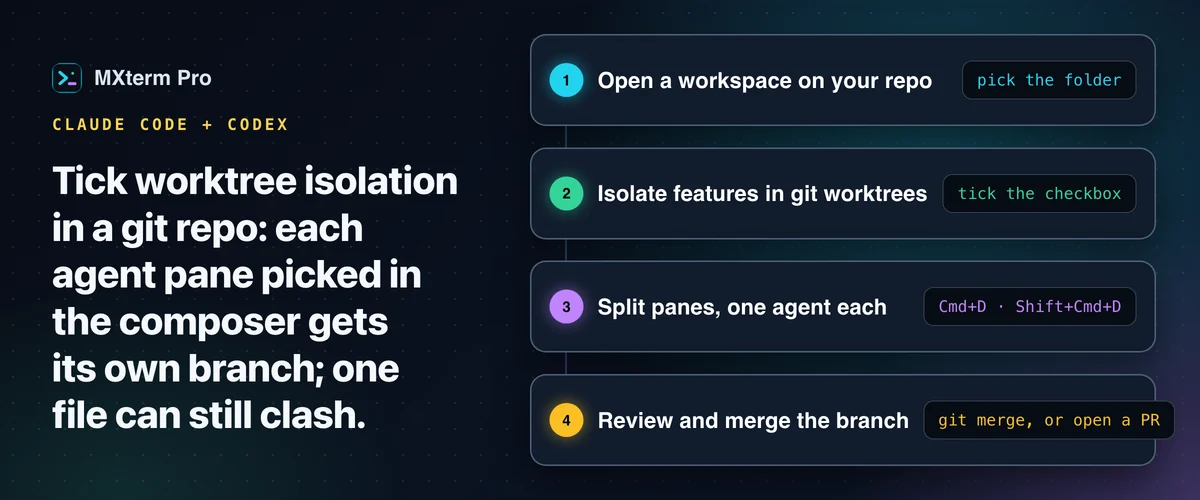
To run Claude Code and Codex in split terminal panes, open a workspace in MXterm Pro with "Isolate features in git worktrees" turned on and pick Claude Code for one pane and Codex for the other. Each agent then works on its own branch instead of fighting over the same checkout. Isolation reduces branch collisions. It does not stop two agents editing the same file.
Why running two agents in one repo usually goes wrong
The failure is almost always the same. You open Claude Code in one terminal tab and Codex in another, point both at the same working copy, and give them different jobs. One agent runs git checkout -b feature-a while the other is mid-edit on main. Now you have uncommitted changes on the wrong branch, or a git status neither agent expects.
Even on one branch, two agents editing overlapping files at the same time produce merge conflicts you have to untangle by hand.
Running them one after another avoids the collision but doubles your wait. You end up babysitting one agent while the other sits idle. The fix is not more careful turn-taking. Give each agent its own working copy on disk, so a git checkout in one pane cannot touch the other's files.
Step-by-step: set up split panes with agent isolation
1. Open a new workspace on your repo. From MXterm Pro's Welcome/New Workspace screen, pick the project folder. Or, on macOS, use the Finder "New MXterm Pro Tab Here" quick action if it appears in your Services menu, or drop the folder on the Dock icon.
2. Check "Isolate features in git worktrees". The description under the checkbox says what it does: "Each agent pane starts in its own worktree and branch." It is off by default.
This only helps inside a git repo. If the folder isn't one, MXterm Pro no longer runs git init for you (changed in 1.0.22). It says so upfront: "This folder isn't a git repository, so agents will share it directly (no worktree isolation)". It then opens plain, non-isolated panes, each with a dismissible notice. Run git init yourself first if you want isolation.
3. Add split panes. Use Cmd+D (split right) or Shift+Cmd+D (split down), or set the pane count in the composer before you create the workspace. More on splitting is in the panes docs.
To rearrange panes later, drag a pane header onto an edge of another pane. The overlay reads Insert Left / Right / Above / Below, and the pane lands beside it at 50/50. Resizing snaps too: let go of a divider within about 3.5% of center and it settles at 50/50. Double-click a divider any time to reset it to 50/50.
4. Launch one agent per pane. Because worktree isolation was on, each agent pane you picked in the composer (Claude Code in one, Codex in the other) already sits on its own branch, named like swarm/brave-otter.
The app generates a short, collision-checked adjective-noun pair rather than reusing agent names. If that name is somehow taken, it retries with a -2 suffix. A plain Terminal pane, or a pane you add later with a split, stays at the repo root.
5. Give each agent a distinct task, scoped to files that don't overlap where possible. For example, "refactor the auth middleware" in pane one and "update the settings UI" in pane two. Isolation reduces the chance of branch collisions. It doesn't stop two agents from independently editing the same shared file, so split along real seams in the codebase.
6. Review and merge from the repo root. When an agent finishes, cd into its worktree (<repo>/.worktrees/<slug>) or pick it in the Worktrees list in the Git panel. Then merge the branch back the normal way: git merge, review the diff, or open a PR. MXterm Pro doesn't merge for you. It only keeps the two working copies apart while the agents run.
Broadcasting one prompt to every pane
Press Cmd+Shift+B on macOS to toggle Broadcast Input when you want the same instruction sent to every agent at once, such as "run the test suite" or "pull latest and rebase". The key map binds Ctrl+Shift+B on Windows.
While it's on, keystrokes typed into your active pane are mirrored in real time to every other pane in the broadcast group. One npm test or one prompt reaches all of them without retyping it per tab.
Broadcast is blunt by design. It doesn't merge output or wait for one agent to finish before the next command lands. It just fans out the same keystrokes. Turn it off (Cmd+Shift+B again) before typing anything pane-specific, like a follow-up answer to one agent's question. Otherwise that answer goes to every pane in the group.
The Multi-Agent Control Room, and where it differs from plain split panes
The Control Room (formerly War Room) is a separate layer on top of split panes with worktree isolation, which stop two agents colliding on disk. It lives in the right auxiliary panel. Alt+Cmd+B toggles the panel on macOS, then pick the Control Room tab. On Windows the key map binds Ctrl+Alt+B, which has not been verified on a real Windows machine.
You join terminal panes to a shared room from each pane's Control Room button. The room keeps one running transcript of joins, leaves, renames and the messages the Moderator and the agents send each other.
If you're typing in a pane, Control Room prompt delivery to that agent is held back until you stop typing or click "Deliver now". That way it doesn't inject a queued instruction mid-keystroke. The Control Room guide covers the rest, and the agents and Control Room docs cover the app side.
Free accounts get up to 2 members per Control Room by default. Pro lifts that cap. There was never a limit on the number of rooms. Running Claude Code and Codex side by side, which is what this guide covers, fits inside the free 2-member room. You only hit the ceiling when you add a third or fourth member to the same room.
Token usage per agent (Token Meter)
MXterm Pro's Token Meter covers both Claude Code and Codex. Click the title-bar chip and each agent gets a row. It expands to an hourly sparkline and a 7-day breakdown. It reads each agent's own transcripts on your machine and needs no API key or account. Nothing is sent anywhere unless you turn on the opt-in live plan-limit lookups. How token usage is counted has the detail.
How this compares to iTerm2, Warp, and tmux
iTerm2 is a mature, scriptable macOS terminal with excellent split panes and a huge plugin ecosystem. It's a fine place to run Claude Code and Codex in two panes manually. Its documentation covers notifications for activity, silence and job completion, an optional AI plugin and a Claude Code integration. It lists no worktree provisioning, so you'd manage branch isolation yourself with git worktree add.
Warp has moved beyond a single chat assistant. Its site describes bringing your own agent, such as Claude Code or Codex, and coordinating fleets of agents from one control plane across web, mobile, terminal and IDE. MXterm Pro is narrower: a local desktop terminal with a worktree per agent pane. See MXterm Pro vs Warp for the full comparison.
tmux gives you the panes and the muscle memory many engineers already have, and it's the closest analog to MXterm Pro's split-pane model. But it's a terminal multiplexer, not a git-aware one.
Broadcasting keys to multiple panes (:setw synchronize-panes on) is a long-standing tmux trick, and MXterm Pro's Broadcast Input mirrors it. Worktree provisioning, agent status tracking and the Control Room transcript aren't things a tmux config replicates without real scripting effort.
None of these are wrong choices. iTerm2, Warp and tmux are all capable terminals. MXterm Pro's gap for this workflow is the combination: worktree isolation wired into workspace creation, agent status detection and broadcast, in one native app, rather than three separate scripts and a .tmux.conf glued together by hand.
Free vs Pro limits for this workflow
The core of this guide works on the free tier: two-pane splits, worktree isolation, broadcast input and a 2-member Control Room. The numbers matter once you scale past a pair of agents.
By default, Free has no limit on terminal panes. It allows 5 saved SSH hosts, 2 Control Room members per room and 1 saved Machine. Pro lifts the SSH host and Control Room member caps.
So the free tier isn't a trimmed-down demo of this workflow. The caps only show up once you run larger squads or manage a fleet of SSH hosts alongside your agents.
When it doesn't work: common snags
The panes opened without worktrees. The folder wasn't a git repository. MXterm Pro stopped running git init for you in 1.0.22. That used to happen automatically and could sweep a .env or a key into a brand-new history nobody asked for. So it falls back to plain shared panes and tells you why.
Run git init yourself, then create the workspace again. If the repo has no commits yet, MXterm Pro adds an "Initial commit" that holds only an empty .gitkeep file, so the worktrees can be created. Nothing else in the folder is committed.
Both agents keep landing on the same files. Worktree isolation reduces collisions on branches and checked-out state. But two agents can still both decide to touch, say, a shared config file from their own copies. That's a task-scoping problem, not something isolation fixes. Split the work along real module boundaries.
Broadcast sent a reply to the wrong pane. This is the most common broadcast mistake. The mode stays on until you toggle it off, so an answer meant for one agent's follow-up question goes to all of them. Toggle Cmd+Shift+B off before anything pane-specific.
Merging the worktree branch back feels like extra steps. It is an extra step by design. Isolation keeps the working copies apart during the run, but MXterm Pro doesn't auto-merge. Treat each worktree branch like any feature branch: review the diff, then merge or open a PR the way you normally would.
Multi-pane SSH, Command Recipes (Cmd+J), and a multi-agent Control Room (formerly War Room): free to start.
Already have MXterm Pro? Read the setup guide →
New to MXterm Pro? See pricing →
Frequently Asked Questions
It's a shared right-panel workspace for running several AI CLI agents together. Each member shows a status dot (working, blocked, idle or done, for agents MXterm can read), prompt delivery is held while you're actively typing, and the full multi-agent session exports as a Markdown report. It's separate from split-pane worktree isolation: you can use either on its own, or both together.
No. You can run them in two plain panes without isolation if they work in different repos, or if you're comfortable managing branch switches yourself. Worktree isolation matters when both agents work in the same repository at the same time. Without it, one agent's git checkout can pull the branch out from under the other.
Yes. Any CLI tool that runs in a shell (Aider, Ollama or a custom script) works in a plain terminal pane, and Broadcast Input doesn't care which binary you launch. Worktree isolation applies to the agent panes you pick in the composer (Claude Code, Codex, Gemini CLI, OpenCode and the other built-in agents). A plain pane stays at the repo root.
Split panes are unlimited on the free tier. A Control Room caps at 2 members per room free (unlimited on Pro). Two agents, Claude Code and Codex, fit comfortably inside the free tier.
No. Broadcast Input mirrors your keystrokes to every pane in the group in real time. It doesn't sequence or wait on agent output. It's meant for identical, short instructions (run tests, pull latest), not a conversation you want each agent to answer independently.