MXterm Pro vs Warp Terminal: Detailed 2026 Comparison
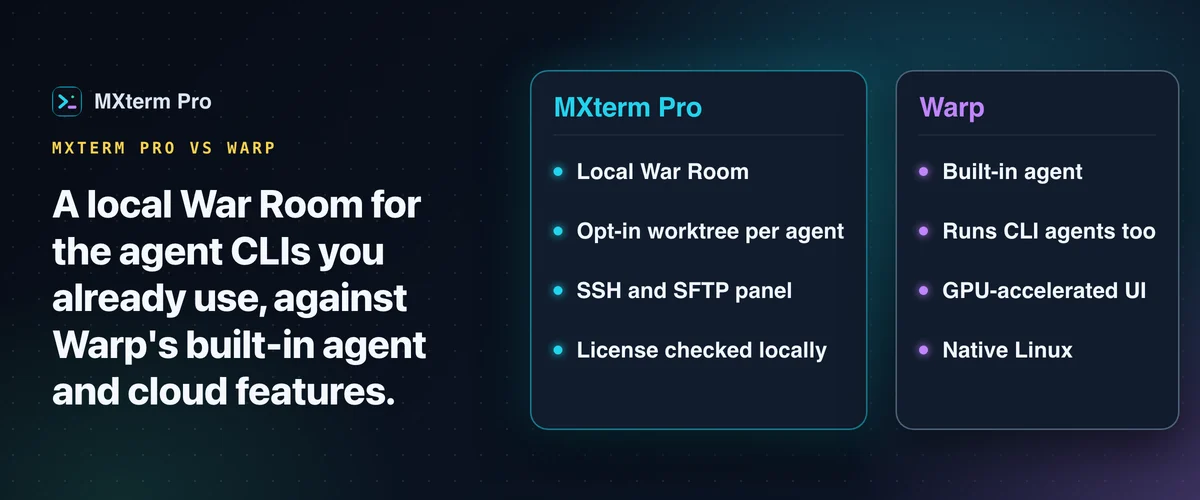
MXterm Pro is a Warp Terminal alternative built to run several AI coding agents side by side in a shared Control Room (formerly War Room), with optional git worktrees per agent. The license is verified locally after a one-time activation. Warp's core terminal works without an account, but its AI and team features are cloud-based. Warp has the more mature, GPU-accelerated interface and a more established Linux build; MXterm Pro's Linux build is a beta.
Who Each Terminal Is Actually Built For
MXterm Pro is for developers who juggle several things inside one project. That means several terminal panes and several AI coding agents working in parallel (Claude Code, OpenAI Codex, Gemini CLI, GitHub Copilot). Often it also means a few SSH-managed servers next to local development. The Control Room, git worktree isolation and built-in SFTP browser keep all of that in one window instead of six separate apps.
Warp calls itself an agentic development environment: a modern terminal plus its own Warp Agent, with support for running third-party CLI agents such as Claude Code and Codex in separate tabs or panes. It also offers cloud agents. That is a broad job, and Warp's interface is more established than MXterm Pro's. If you want that integrated agent platform, Warp is a strong pick.
Related guideMobaXterm vs iTerm2 vs MXterm Pro: 2026 Developer BreakdownHow the Multi-Agent Control Room Actually Works
Open the right panel with Option+Cmd+B, pick its Control Room tab, and add a pane to a room with the Control Room button in its header. You can put several AI coding agents into the same room, each running in its own real terminal pane.
Agent panes show a state dot, so with four agents open you can see which one is blocked on you. Agents without a state detector, such as GitHub Copilot, Amp and Antigravity, show no state dot.
Turn on the "Isolate features in git worktrees" checkbox in the new-tab composer. It is off by default and works in git repositories only. Every agent pane in a repository then gets its own checkout under <repo>/.worktrees/<slug> on a new branch named swarm/<adjective>-<noun>, such as swarm/brave-otter. Plain shell panes stay at the repo root.
That's the concrete mechanism, not a slogan. A git worktree per agent reduces the chance that one agent's mistake, like a bad rebase or a stray git checkout ., touches another agent's working copy. The reason is simple: they are different directories on different branches.
If you're mid-sentence in a terminal pane, Control Room holds any queued prompt delivery instead of interrupting you. It waits until you stop typing, plus a six-second quiet window, or until you click "Deliver now."
When a session wraps up, the Report (.md) button exports the room roster, the dialogue and the system events as one Markdown file. It reads more like a transcript than a chat log, but it records what was said in the room, not what each agent ran in its pane.
By default, the Free tier caps a Control Room at 2 agents. Pro removes that cap. The number of rooms you can run was never capped.
Command Recipes vs Warp Agent
Warp's built-in agent, the Warp Agent, writes and edits code, debugs issues, runs commands and works through multi-step tasks. It has a terminal mode and a dedicated agent conversation mode. MXterm Pro has no built-in AI assistant like that.
The closest thing is Command Recipes, opened with Cmd+J. Type what you're trying to do, and it matches your keywords against a fixed set of ready-made Linux commands. It shows one with a short description before you run it.
Quick chips cover common jobs (disk usage, open ports, reloading Nginx), and an "Insert & Run In Terminal" button types the command and presses Enter. It doesn't use a model, so it can't help with anything outside its recipe set.
Warp also lets you pick models from several providers and run third-party CLI agents alongside its own. MXterm Pro doesn't ship a model of its own. If you want an agent built into the terminal, that's Warp's approach. If you already run several coding agents on their own subscriptions, MXterm Pro is built to help you manage them side by side rather than replace them.
SSH and SFTP: A Saved-Host Manager and an SFTP Panel
Warp's SSH support brings its input editor, blocks and completions to remote sessions. Its SSH extension adds a remote file tree, code editor and code review on macOS and Linux hosts. Warp's SSH documentation describes no SFTP transfer client, so pair it with Termius, Cyberduck or the sftp/rsync CLI if you need to move files to a remote host.
MXterm Pro's SFTP panel opens as a remote file browser. Local files go through Finder drag-and-drop or the native picker. A few things are built directly into the panel.
Double-click a .env* file, an nginx.conf, a Dockerfile or a YAML file, and it opens in a syntax-highlighted remote editor that saves back over SFTP. Right-click any file for a chmod calculator that turns checkboxes into the octal permission (755, 644, 600, 777), so you skip the math.
A stats bar at the foot of the SSH tab shows the host's CPU, RAM and disk usage, refreshed every 20 seconds (Linux servers with python3 only).
On the tier line, the whole SFTP panel is on the Free tier. Browsing, opening, editing, chmod and moving files in either direction all work without a license. Transfers were Pro-only until 1.0.22, which removed that gate.
Free vs Pro: The Actual Numbers
MXterm Pro's Free tier has no pane limit. It allows up to 5 saved SSH hosts, up to 2 AI agents in one Control Room and 1 saved Machine. The SFTP panel is free in full: browsing, editing, the chmod calculator and file transfers. So is the Markdown Control Room report exporter.
The Pro tier removes those caps: unlimited saved hosts and unlimited Control Room agents per room (the number of rooms was never capped). Free also saves one Machine, another MXterm you control from this one, and Pro lifts that limit too. Since 1.0.22 no SFTP feature sits behind a license.
Warp prices differently. Its plans run from a Free plan through paid individual plans to per-seat team plans, and they are organized around included AI agent usage, measured in credits, plus team features. Check Warp's pricing page for current dollar amounts before comparing. Those numbers move independently of what either terminal's feature set does.
Offline Licensing and What Telemetry Actually Sends
MXterm Pro's license check runs locally. It uses an Ed25519 signature on your license token, verified in Rust against a public key built into the app, with no server contact after activation. The server ties each activation to your device's hardware ID and enforces the seat count.
On telemetry, official builds send three anonymous reports, on by default. The first is an app-open event and five-minute heartbeat to Google Analytics. The second is a daily check-in to mxterm.net. The third is an event for one of eight specific failures.
The daily check-in carries the app version, tier, OS version and architecture, launch count, how often upgrade prompts were shown and clicked, and a random install ID. That ID is not derived from your license, hardware ID or email.
Dev and source builds send none of these three reports. DO_NOT_TRACK, MXTERM_TELEMETRY_DISABLED or the Privacy switch in Settings turns all three off.
MXterm Pro vs Warp Terminal, Feature by Feature
Account and sign-in: MXterm Pro needs no account to install or use. You activate with a license key, which is exchanged with mxterm.net once and then verified locally. Warp's core terminal works without signing in, but its AI and team features are cloud-based and need an internet connection.
Platforms: MXterm Pro ships for macOS, Windows and Linux (beta). The Windows installer is not code-signed yet, and the Linux build is a beta for Ubuntu 22.04 or later (a .deb and an AppImage), so it is less mature than Warp's, which matters if Linux is your daily driver. Warp supports macOS, Linux and Windows, and that broader, more mature reach is a clear advantage for Warp.
Interface maturity: Warp's Rust-built, GPU-rendered interface and command "blocks" UI are more established and more polished than MXterm Pro's WebGL-rendered panes.
Multiple agents: Warp also documents running Claude Code, Codex and other CLI agents in separate tabs or panes, with vertical tabs, notifications and an optional git worktree per agent. MXterm Pro's version of that is the shared Control Room described above.
Where iTerm2, Termius, and MobaXterm Fit Instead
MXterm Pro and Warp are not the only options, and none of these tools competes for exactly the same job.
iTerm2 is a mature, free, macOS-only terminal emulator with deep customization and no built-in multi-agent workspace. It's a good fit if you just want the best plain terminal on a Mac.
Termius is built around SSH itself, with strong mobile and cross-device sync for saved hosts. It isn't a general-purpose multi-pane dev terminal or an AI agent workspace. MobaXterm is a Windows-first all-in-one connection manager (SSH, RDP, X server and more) aimed at sysadmins managing many remote sessions, not at running AI coding agents locally. For the head-to-head, see MXterm Pro vs Termius.
If you're weighing those three against each other specifically, that comparison is covered in more depth on this site.
Which One Should You Actually Pick
Pick Warp if you want a modern, GPU-accelerated terminal with a built-in agent platform, including cloud agents. It also fits if you're fine with cloud-backed AI features and need a mature Linux build today.
As a Warp Terminal alternative, pick MXterm Pro if you run more than one AI coding agent against the same project and want them isolated by git worktree. It also fits if you manage SSH servers and want SFTP without leaving the terminal, or if a license check that runs locally after a one-time activation matters to you.
Both can run several agents in parallel. The right pick depends on whether you want Warp's integrated agent platform or MXterm Pro's Control Room and built-in SFTP.
Multi-pane SSH, Command Recipes (Cmd+J), and a multi-agent Control Room (formerly War Room): free to start.
Already have MXterm Pro? Read the setup guide →
New to MXterm Pro? See pricing →
Frequently Asked Questions
No account is needed. Activating a license key contacts mxterm.net once, which needs internet. After that the license is a signed token, verified locally by Ed25519 signature, no server. The server binds the activation to your hardware ID and enforces the seat count. AI CLI providers you configure (Claude Code, Codex) and app update checks still need internet. The terminal and the license check run offline after activation.
Warp has its own built-in agent and can also run third-party CLI agents such as Claude Code and Codex. MXterm Pro ships no AI model or assistant of its own. Its Command Recipes (Cmd+J) is a fixed set of Linux commands matched by keyword. Its Control Room runs several external agents (Claude Code, Codex, Gemini CLI, Copilot) side by side, with optional worktree isolation.
Free gives you unlimited split panes, up to 5 saved SSH hosts, up to 2 agents per Control Room and 1 saved Machine. It also includes the whole SFTP panel, transfers included, and the Markdown report exporter. For remote access, Free can set a Temporary access password for up to 8 hours, while a Standing one needs Pro. Pro removes the counts. It also adds My Devices (open your other signed-in Macs with no code or password) and a Standing (non-expiring) access password, and lets a Temporary one last up to 7 days. Since 1.0.22 no SFTP feature needs a license: uploads and downloads used to require one and no longer do.
Yes, as a beta. MXterm Pro ships for macOS and Windows, plus a Linux beta (a .deb and an AppImage for Ubuntu 22.04 or later). If Linux is your primary OS, Warp's more mature native Linux support is still a real advantage over MXterm Pro today.
There's no direct import tool for Warp Workflows or Warp Drive content, so you'd recreate saved commands manually. MXterm Pro offers the Control Room's Markdown report exporter instead. It captures the room roster, the dialogue and the system events of a Control Room session as one file after the fact. That serves a similar record-keeping purpose, but it isn't a drop-in replacement for Warp's saved-workflow library.
Official builds send three anonymous reports: a daily usage ping (version, tier, OS, launch count, upgrade prompts, random install ID), one of eight failure events and a Google Analytics app-open event with a five-minute heartbeat. Dev and source builds send none of these three. The Privacy switch, DO_NOT_TRACK or MXTERM_TELEMETRY_DISABLED turns all three off. None of it links to your license, hardware ID or email.