MobaXterm vs iTerm2 vs MXterm Pro: 2026 Developer Breakdown
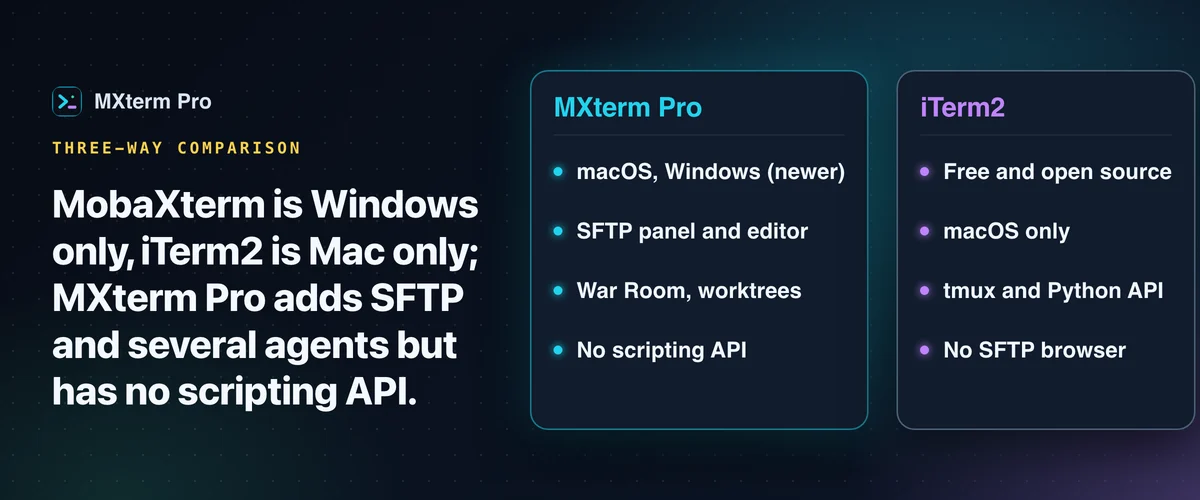
MobaXterm vs iTerm2 vs MXterm Pro comes down to platform. MobaXterm is the Windows-only toolbox for SSH and X11. iTerm2 is the free, native Mac terminal with the deepest local customization. MXterm Pro is the newest, a native macOS and Windows app. It offers MobaXterm-style SFTP and session management without Wine, and runs several AI coding agents side by side.
What MobaXterm, iTerm2, and MXterm Pro Actually Are
MobaXterm is a Windows-only all-in-one toolbox. It bundles an SSH client, embedded X11 server, RDP/VNC viewer, network scanner and macro recorder, with Cygwin commands built in. Its free Home edition caps saved sessions at 12 and macros at 4, and the paid Professional edition lifts those caps. There is no native macOS or Linux build.
iTerm2 is a free, open-source, macOS-only terminal replacement. It has been a popular upgrade over Terminal.app for Mac developers for years. Its features are built around local shell use on one machine: a hotkey window, tmux integration, a Python scripting API and a Metal GPU renderer.
MXterm Pro is a native Tauri 2 + Rust desktop app for macOS and Windows. It positions itself as an alternative to running MobaXterm on a Mac through a Windows compatibility layer. The Windows build is newer and unsigned. It adds a built-in SFTP GUI and a multi-agent Control Room (formerly War Room) for running several AI coding agent CLIs in the same workspace.
MXterm Pro is also the newest product here. Its 1.0 line began in August 2026 and it still iterates multiple times a week. Weigh that against the much longer track records of iTerm2 and MobaXterm.
Platform Architecture and Real-World Performance
None of the three publishes independent, third-party FPS or CPU benchmark numbers, and this article does not invent any. Architecture is the fair basis for comparison, because it drives how a terminal feels day to day.
MobaXterm is a Windows application with a Cygwin layer, which suits Windows. It has no native Mac build, so on a Mac it would have to run through a compatibility layer like Wine or CrossOver. It is not a Mac app, so it won't follow Mac conventions such as native shortcuts and window behavior.
iTerm2 is a native macOS application with a Metal-accelerated renderer, which is part of why local sessions feel fast. That performance ceiling only applies on macOS, since there is no Windows or Linux build.
MXterm Pro runs a real Rust PTY backend (portable-pty) inside a Tauri 2 shell. The frontend is a webview running xterm.js over that PTY. Tauri uses the operating system's own webview instead of bundling a full Chromium runtime the way Electron apps do. A terminal pane in MXterm Pro is only as powerful as the shell process behind it.
SFTP, Remote File Tools, and Server Visibility
iTerm2 has no SFTP browser. You can run scp or rsync by hand, or use its right-click download and Option-drop upload, which also go over scp. For a remote file tree, pair it with a separate app like Transmit or Cyberduck.
MobaXterm has a built-in SFTP sidebar tied to each SSH session. It also offers X11 forwarding for remote GUI apps, an embedded network scanner and a macro recorder for repeating remote tasks.
The MXterm Pro SFTP panel browses the remote host in a side panel. Local files go through Finder drag-and-drop or the native picker, not a second in-app tree. It adds a remote config editor for .env, nginx.conf, Dockerfile and YAML files, an octal chmod calculator, and a live CPU, RAM and disk bar over the same SSH connection.
Remote search runs a literal grep -rnI on the server. It returns the first 60 matching lines, skips .git, node_modules, vendor and similar folders, lists each match with its line number, and opens the chosen file in the editor. All of it, transfers included, is on the Free tier.
AI Agent Orchestration: Control Room, Git Worktree Isolation, and Command Recipes
MobaXterm's feature pages do not list AI integration. iTerm2 has an optional AI Chat: you install a separate AI plugin and bring your own API key for a provider such as OpenAI, or for a compatible endpoint such as Ollama. Each chat window holds one conversation. It is a chat with one model, not a room of several agent CLIs.
MXterm Pro's Control Room runs several agent CLIs at once in split panes. To join a pane to a room, use the Control Room button in its header. The room's roster and discussion live in the right auxiliary panel (Option+Cmd+B on macOS, Alt+Ctrl+B on Windows).
The Control Room detects each agent's state automatically: working, blocked, idle or done. You don't have to tab through panes to find the stuck one. Detection covers nine agent CLIs: Claude Code, Codex, Gemini, Cursor, OMP, Grok, Qwen Code, OpenCode and Goose. OMP, Grok and Qwen Code are only read for one thing, a tool waiting for your approval, and Goose's rules are not tested on a live session yet.
When a workspace has Isolate features in git worktrees turned on, each agent pane is created in its own <repo>/.worktrees/<slug> directory (for example .worktrees/swarm-brave-otter). Each gets a new swarm/<adjective>-<noun> branch such as swarm/brave-otter. Plain shell panes stay at the repo root.
A git worktree per agent reduces the chance that one agent's file edits collide with another's working copy while they run at the same time. It doesn't stop an agent from making a bad edit inside its own worktree. You still review diffs before merging, as you would with a single agent.
Command Recipes (Cmd+J) is a separate, smaller feature and does not use AI. Type a task in English or Vietnamese, and it matches your keywords against a fixed set of ready-made Linux commands.
It shows the one that fits with a one-line description and buttons to copy it or run it in the pane (running types it and presses Enter). It covers the "how do I find the 20 largest log files again" moments without leaving the terminal to search.
Free vs Pro: What Each Tier Actually Limits
iTerm2 has no paid tier: it is free and open source. MobaXterm's free Home edition caps saved sessions at 12, SSH tunnels at 2 and macros at 4, according to its download page. The paid Professional edition lifts those caps.
By default, MXterm Pro's Free tier has no pane limit, and gives you up to 5 saved SSH hosts, 2 members per Control Room and 1 saved Machine. That is enough to try the SFTP GUI, the remote editor and a couple of agents side by side before paying anything.
The Control Room Markdown report exporter is full access on Free, and so is the whole SFTP panel, transfers included. Pro lifts the SSH host limit and the per-room member limit.
Pricing is a one-time purchase, not a subscription: you pay once and the license doesn't expire. One license activates a set number of devices, Mac and Windows combined. Solo is $29 for 3 devices, Team is $59 for 10, Startup is $99 for 30 and Max is $199 for 100.
Scripting Depth and How Long Each Has Actually Been Around
iTerm2 has the deepest scripting story of the three: a full Python API (the iterm2 package) for custom automations, tight tmux integration and an AppleScript interface that is now deprecated. It is also by far the most mature product here, with a long track record as a Mac terminal upgrade.
MobaXterm's automation is a macro recorder plus Cygwin: record a sequence of remote commands once, replay it on demand. It is also a long-established Windows SSH and X11 client.
MXterm Pro's documentation lists no AppleScript- or Python-level automation API. If you need to script the terminal application itself, iTerm2 is the more capable tool. MXterm Pro takes a different route: you point real agent CLIs at your repo and let them run actual shell commands as themselves, with worktree isolation keeping their edits apart.
Weigh the age of each product too. MXterm Pro is young (its 1.0 line began in August 2026), so it has nowhere near iTerm2's or MobaXterm's years of field-tested edge cases. In exchange, it has a much faster release cadence while the feature set is still being filled in.
Migrating from MobaXterm, and Which One to Actually Pick
If you're switching from MobaXterm, MXterm Pro's SSH Host Manager Import button reads a MobaXterm session file (SSH sessions only, with their name, host, port and user, filed under a "MobaXterm" group) as well as a plain OpenSSH ~/.ssh/config (Host, HostName, User, Port and IdentityFile entries), so you don't re-enter every server by hand. Passwords and key files from MobaXterm are not imported.
In MobaXterm vs iTerm2 vs MXterm Pro, the right pick depends on the job. On Windows, MobaXterm's native toolbox is still the more complete package if you need X11 forwarding, an RDP/VNC viewer and a network scanner in one app.
On a Mac, free iTerm2 is very hard to argue against if you don't need SFTP or AI features. You get the deepest local shell customization and a mature scripting API.
If you want MobaXterm-style SFTP and session management on a Mac without Wine, MXterm Pro is built for that gap. The same goes if you regularly run more than one AI coding agent and want their file edits kept apart with git worktrees. The head-to-head pages are MXterm Pro vs iTerm2 and MXterm Pro vs MobaXterm.
The Free limits above are enough to try that workflow on your own servers and repos before you decide whether Pro is worth $29 and up.
Multi-pane SSH, Command Recipes (Cmd+J), and a multi-agent Control Room (formerly War Room): free to start.
Already have MXterm Pro? Read the setup guide →
New to MXterm Pro? See pricing →
Frequently Asked Questions
MXterm Pro is the closest match. It is a native Mac (and Windows) app with a built-in SFTP GUI, a remote config editor and a server telemetry HUD. It also imports OpenSSH ~/.ssh/config files, MobaXterm session files and iTerm2 profiles, so you don't re-enter every host. iTerm2 is the more mature choice if you don't need the SFTP/remote-file side of MobaXterm's workflow.
Yes. The SSH Host Manager's Import button reads a plain OpenSSH ~/.ssh/config (Host, HostName, User, Port, IdentityFile entries) into saved hosts. The same button also reads MobaXterm session files and iTerm2 profile exports, and on a Mac the Session Manager's Import / Export tab can scan for iTerm2 profiles.
Both. MXterm Pro ships builds for macOS and Windows x64. The Windows installer is newer and not yet code-signed, so expect a SmartScreen "Unknown publisher" prompt. That answers MobaXterm's Windows-only limitation on Mac and iTerm2's macOS-only limitation on Windows.
No, MXterm Pro is a one-time purchase. You buy a license once (from $29 for 3 devices up to $199 for 100 devices), and it doesn't expire or renew.
Not a browser. iTerm2 can download or upload single files over scp from its right-click menu and drag-and-drop, and you can run scp or rsync by hand, but it has no remote file tree. For that you would use a separate app like Transmit or Cyberduck alongside it.
No. MobaXterm has no native macOS build. On a Mac it would have to run through a Windows compatibility layer like Wine or CrossOver.
The Free tier has no pane limit, so you can run as many agents at once as you give panes. The Control Room member limit is a separate number: 2 members per room on Free. Automatic state detection (working, blocked, idle, done) covers 9 agent CLIs: Claude Code, Codex, Gemini, Cursor, OMP, Grok, Qwen Code, OpenCode and Goose (OMP, Grok and Qwen Code only report a tool waiting for your approval). Pro removes the per-room member limit.