MobaXterm for Mac: How to Run It, or What to Use Instead on macOS
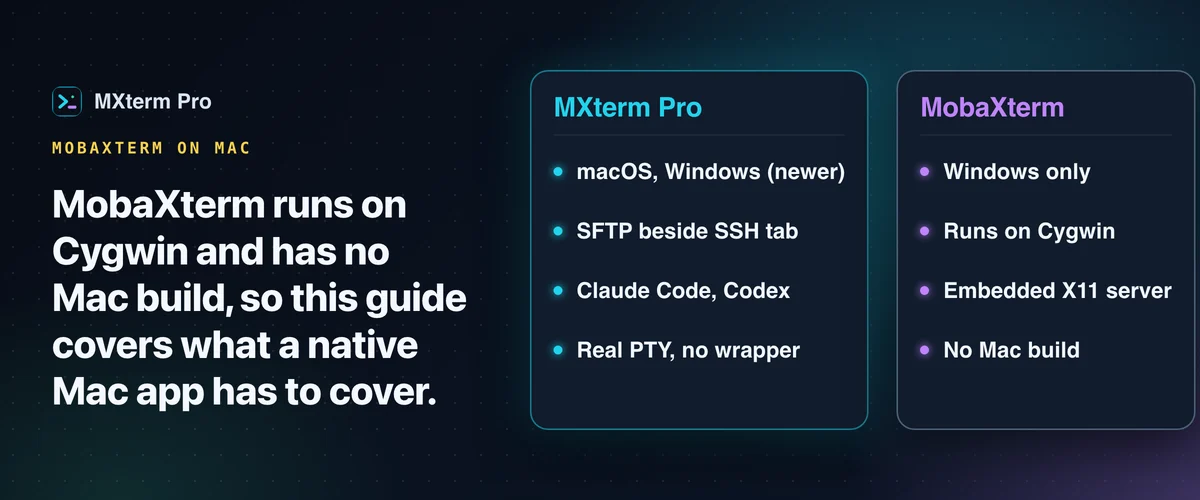
MobaXterm for Mac doesn't exist. MobaXterm runs on Cygwin, a Windows-only layer, and Mobatek ships no Mac build. MXterm Pro is the native alternative: SSH, SFTP and monitoring, plus Command Recipes and a multi-agent workspace. This guide covers your real options.
Why MobaXterm Doesn't Run Natively on macOS
MobaXterm on Windows bundles three things the OS doesn't include: Cygwin (POSIX compatibility), an embedded X11 server and a PuTTY-based terminal engine, all in one Windows app.
macOS doesn't need the POSIX layer. It already ships zsh/bash, OpenSSH and a real Unix userland. Mobatek has not announced a macOS build, so MobaXterm for Mac is not an option today.
Running MobaXterm on Mac via Wine or CrossOver: Is It Worth It?
MobaXterm is a Windows .exe, so it can technically launch under CrossOver (a paid, packaged version of Wine) or plain Wine with some manual setup. People do get it running. Whether it's usable day to day is a different question.
The best MobaXterm features, the X11 server and GUI rendering, are the most likely to give trouble under Wine. Graphical apps may not forward cleanly and Retina scaling can look wrong.
None of this is a knock on MobaXterm itself. It's a well-built Windows app doing what it was designed to do, and the friction comes entirely from the compatibility layer.
If you only need to poke at one server occasionally, CrossOver might be tolerable. For daily production SSH work, many people running MobaXterm under Wine on a Mac look for a native alternative.
Related guideMobaXterm vs iTerm2 vs MXterm Pro: 2026 Developer BreakdownWhat a Mac-Native MobaXterm Replacement Needs to Cover
Anyone who lives in a terminal (SREs, DevOps engineers, backend developers) needs saved SSH sessions, an SFTP browser that follows your terminal path and server monitoring. A Mac replacement has to cover them.
MobaXterm wasn't built for AI agents. MXterm Pro runs Claude Code, Codex CLI and Gemini CLI as first-class terminal sessions. Each agent can optionally get its own git worktree, which reduces the chance of agents overwriting each other's changes.
How MXterm Pro Works: Real PTY, Not a Wrapper
MXterm Pro is built on Tauri 2 with a Rust backend, and its terminal is a real PTY. Rust's portable-pty spawns the shell process. A reader thread decodes the output and streams it to the frontend over a Channel<PtyOut>, emitting data chunks and then an exit event when the shell closes. The frontend renders the stream with xterm.js.
UTF-8 multi-byte sequences that land on a read boundary are buffered and joined before rendering, so box-drawing glyphs don't split into broken characters.
SFTP GUI and Remote File Editing
SSH to a host and MXterm Pro opens an SFTP browser alongside the terminal, the same auto-pairing MobaXterm users know. Drag-and-drop or the native file picker uploads. The file's Download button or right-click menu saves to ~/Downloads.
Double-clicking a .env*, nginx.conf, Dockerfile or YAML file opens it for direct remote editing with syntax highlighting. If the file changed on the server after you opened it, saving is refused and a dialog lets you reload the server copy or overwrite it anyway. The check needs python3 on the server. Without it, saves go through unguarded.
The SFTP search matches file contents across the directory tree, not just filenames. That helps when you're hunting for the config file that sets a value.
Right-click a file or folder for a chmod calculator that toggles octal permissions (755, 644, 777, 600). No arithmetic required.
Saved SSH Hosts, Live Telemetry, and Migrating Your MobaXterm Sessions
SSH Host Manager (Cmd+Shift+H on Mac, Ctrl+Shift+H on Windows) saves hosts with a group, key paths and jump-host chaining, so you don't retype connection details. You can remap that shortcut, one of 17, in Settings → Shortcuts. SSH and SFTP have not yet been verified on Windows.
Once connected, a stats bar shows uptime, CPU load, RAM and root-disk usage from the remote host, refreshed every 20 seconds over the same SSH connection. Nothing is installed on the server, but it needs a Linux host with python3.
Migrating from MobaXterm? Import your MobaXterm session file, OpenSSH configs or VS Code ~/.ssh/config files directly into the Host Manager. Coming from iTerm2 instead? The Import / Export tab of Session Manager reads your iTerm2 profiles, turning a profile with a folder into a Saved Session and a plain ssh command into an SSH host.
Double-check the auth type (password vs. key) and the user on each imported host before connecting. A MobaXterm session without a user is imported as root.
Beyond MobaXterm: Command Recipes, Multi-Agent Control Room, and Git Worktree Isolation
Cmd+J opens Command Recipes. Describe a task (find large files, check open ports) and it shows the matching built-in command, so you don't need to remember the flags.
The Multi-Agent Control Room (formerly War Room) runs Claude Code, Codex and Gemini CLI side by side. MXterm Pro reads each agent pane's state (working, blocked, idle or done), so you see at a glance which one needs attention.
Typing-deferral holds a queued prompt while you're actively typing, so it doesn't land in the middle of your keystrokes. Click Deliver now or finish typing to release it.
At any point, the Report (.md) button in a room's Discussion tab exports the roster and the full transcript, including system events and message text, to one Markdown file. Available on Free and Pro.
Git Worktree Isolation is an option in the new-tab composer (off by default). When it is ticked in a git repo, each agent pane gets its own worktree at <repo>/.worktrees/<slug> on a swarm/<adjective>-<noun> branch. MXterm Pro adds .worktrees/ to .gitignore. A git worktree per agent reduces the chance of working-copy collisions. Plain shell panes stay at the repo root.
Free vs Pro: What's Actually Limited
By default, Free has no pane limit. It gives you 5 saved SSH hosts, 2 agents per Control Room and 1 saved Machine, with all SFTP features included.
Pro lifts the caps on SSH hosts and agents per Control Room: unlimited SSH hosts and unlimited agents per Control Room. Rooms were never capped.
The license uses an Ed25519 signature check that runs offline at launch, with no network needed. The hardware ID is sent only when you activate or deactivate, for seat counting.
If the signature check fails, the app falls back to the Free tier rather than unlocking Pro.
MobaXterm Alternatives on Mac: How iTerm2, Warp, and Termius Compare
MobaXterm isn't the only Mac terminal option. Here's where each real alternative fits.
iTerm2 is free, mature and deeply customizable (profiles, a hotkey window, tight tmux integration). It's the default pick for most Mac developers who just want a better terminal emulator.
It doesn't ship a built-in SFTP GUI or server telemetry, so you'd normally pair it with a separate app like Cyberduck or Transmit for file transfers. It also has no concept of AI agent orchestration.
Warp is built around an AI-assisted terminal: command blocks, inline AI help and its own built-in agent. It can also run several agents in separate tabs or panes. A strong choice if you want AI built into the terminal itself. MXterm Pro is built around a shared Control Room and optional git worktree isolation per agent. Different jobs.
Termius is a clean, cross-platform SSH/SFTP client with host sync across your devices, snippets and port forwarding. It's a solid MobaXterm alternative for SSH and SFTP across Mac, iPad and Windows, as long as a multi-agent workspace isn't on your list.
For a side-by-side of MobaXterm, iTerm2 and MXterm Pro, see the full comparison. The product pages are MobaXterm for Mac and MXterm Pro vs MobaXterm.
Multi-pane SSH, Command Recipes (Cmd+J), and a multi-agent Control Room (formerly War Room): free to start.
Already have MXterm Pro? Read the setup guide →
New to MXterm Pro? See pricing →
Frequently Asked Questions
Yes, technically. MobaXterm is a Windows .exe and can launch under CrossOver or plain Wine. It can work for occasional use, but for daily production SSH work many people switch to a native app.
Yes. By default, Free gives you unlimited panes, 5 SSH hosts, 2 agents per Control Room, 1 saved Machine and every SFTP feature, with no registration and no catch. Pro lifts the SSH host and Control Room caps. It doesn't unlock any SFTP feature.
Yes, for SSH sessions. The Host Manager's Import button reads a MobaXterm session file (.mxtsessions or the sessions in MobaXterm.ini) and adds each SSH session as a saved host in a MobaXterm group. It also reads OpenSSH and VS Code ~/.ssh/config files (Host entries that have a HostName). Other session types, macros and X11 settings don't carry over, passwords are not imported, and you should check the auth type on each host before connecting.
Both. MXterm Pro is native on macOS and Windows, with the same Tauri 2 + Rust backend, and shortcuts adjust per platform (Cmd+J on Mac, Ctrl+J on Windows). A Linux build isn't shipped yet. Windows is newer: 1.1.0 is the first public Windows build (x64), and SSH and SFTP there aren't verified yet. The installer isn't code-signed, so SmartScreen shows an Unknown publisher warning.
Warp is built around an AI-assisted terminal with command blocks and its own built-in agent, and it can run several agents in separate tabs or panes. MXterm Pro runs Claude Code, Codex and Gemini CLI in parallel panes, each optionally in its own git worktree, with a shared Control Room panel showing every agent's state. Different jobs, so the choice depends on which you need.