Running Cursor Agent in a Multi-Pane Terminal on Mac
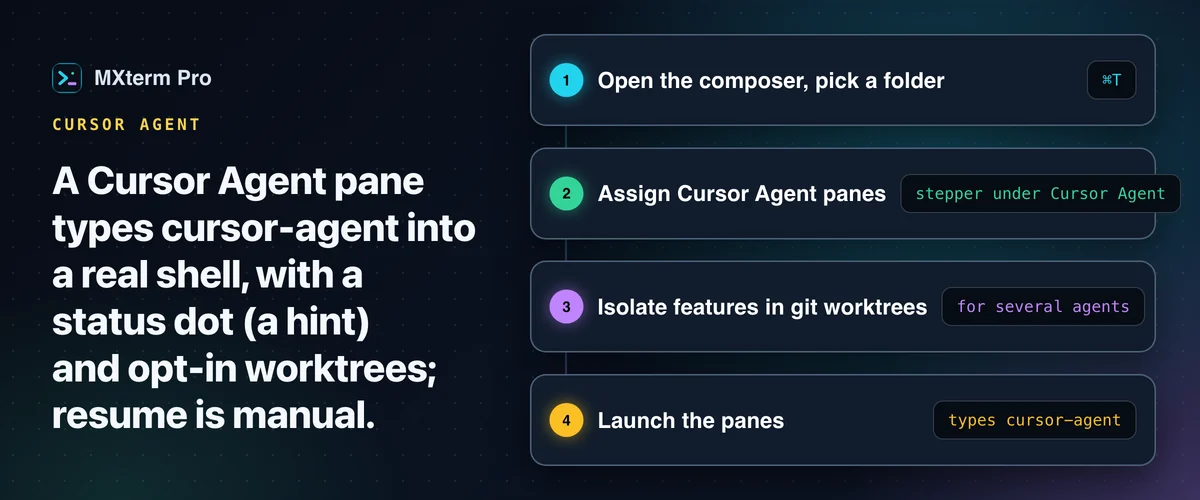
You can open a Cursor pane with MXterm Pro's Cursor Agent template on a Mac: it types cursor-agent, Cursor's agent CLI, into a real terminal pane (a PTY). The cursor command is the editor's launcher and opens the Cursor window. A Windows x64 build also exists. MXterm adds live status detection every 300 milliseconds, plus opt-in git worktree isolation.
What This Is, and Who It's For
MXterm Pro doesn't intercept what cursor-agent does. It's a multi-terminal, multi-agent desktop app (built on Tauri 2 and Rust, not Electron) that types cursor-agent into a real terminal pane through its Cursor Agent template.
On top of that, it adds two things a plain terminal lacks. One is a status indicator that shows at a glance whether the agent needs you. The other is opt-in git worktree isolation, for when more than one agent touches the same repo.
This is for developers who already drive Cursor's agent from the command line. They want it beside a second terminal they control, or beside a second and third agent. Claude Code, Codex, Gemini CLI, OpenCode and others work in the same workspace, each on a different part of the same codebase. You don't have to babysit separate OS windows to see who's stuck.
Setting Up a Cursor Agent Pane
To open a Cursor Agent pane you need one thing: a cursor-agent executable on your PATH or in common bin folders such as /opt/homebrew/bin and ~/.local/bin. That is the agent CLI; cursor is the editor's launcher and opens the Cursor window. If MXterm can't find cursor-agent, the Cursor Agent row in the setup screen (MXterm calls it the composer) shows "Not installed" instead of the count stepper.
1. On a first launch, or when no saved tabs come back, MXterm Pro opens on the composer; otherwise press ⌘T for a new one.
2. Pick your project folder. This becomes the working directory for every pane you create.
3. Use the stepper under "Cursor Agent" to assign one or more panes to it. Leave the rest as plain shells, or split them across Claude Code, Codex or the other agent CLIs MXterm detects.
4. If you're running more than one agent, turn on "Isolate features in git worktrees" (covered below).
5. Press ⌘/Ctrl+Enter. MXterm types cursor-agent into that pane's shell.
Agent detection re-runs every time you reopen the composer. If you install the CLI while MXterm is running, close and reopen the composer. You do not need to restart the app.
Your tabs and pane layout are saved and restored on relaunch, but the processes inside them are not resumed. Every pane gets a new terminal in its directory. A restored Cursor Agent pane starts cursor-agent again as a fresh start, with no resume and without the brief it was first given.
Live Status Detection: How MXterm Knows What Cursor Is Doing
This isn't a Cursor API integration: MXterm never talks to Cursor's backend for this. It matches patterns in the text already rendering in the pane. A screen-reading tick runs about every 300 milliseconds and skips the read while the pane is idle and nothing new has been printed.
Three rules decide the state. A line matching permission, allow…? or do you want to reads as blocked. A line matching thinking…, generating…, working… or analyzing reads as working. A line ending in cursor> reads as idle, and a screen that matches nothing also falls back to idle.
MXterm's own source says these Cursor patterns were written by hand and have not been checked against a real Cursor session. Treat the dot as a hint.
Right after a pane spawns, the state is unknown for about three seconds while the startup screen is ignored. If the pane's terminal process exits, the state stays unknown, so the pane shows only the plain activity dot (and only while it prints) until the pane is respawned. A respawn starts a new three-second grace.
The same rule engine runs for Claude Code, Codex, Gemini, OpenCode and the other agent CLIs MXterm supports. A Cursor pane's header therefore uses the same dot colors as any of them: red for blocked, yellow for working, green for done, and the plain activity dot when the state is unknown.
Inactive tabs in the tab strip carry up to two marks: a busy mark while an agent is working, and a red dot (blocked) or green dot (done). The sidebar lists the active tab's terminals, each with its own dot.
A background pane also chimes about a second and a half after it blocks or finishes. In Settings → Notifications you can switch off alerts for Cursor alone (chime and banner) without touching Claude Code's or Codex's.
Resuming a Cursor Session: What's Automatic and What You Do Yourself
Automatic discovery covers Claude Code, Codex, and Gemini/OpenCode sessions, but not Cursor. MXterm's composer has a Resume sessions list that reads a CLI's own on-disk history and reopens a past conversation as a new pane with one click. Cursor's own session store isn't scanned yet, so it won't show up in that list.
MXterm has no list of Cursor sessions and no field for a Cursor session ID. To resume a specific Cursor conversation, run Cursor's own agent CLI (cursor-agent) by hand in the pane's shell. Everything else around it (the pane, the status dot, the worktree it's in) is the same MXterm workspace either way.
Running Cursor Next to Claude Code or Codex: Git Worktree Isolation
Turn on Isolate features in git worktrees in the composer, and every agent pane it creates, Cursor included, gets its own worktree at <repo>/.worktrees/<slug>. The slug is the branch name with the slash written as a dash. For the branch swarm/azure-falcon, the folder is .worktrees/swarm-azure-falcon.
The branch is fresh and randomly named, like swarm/azure-falcon. MXterm also adds .worktrees/ to your .gitignore automatically, so these throwaway checkouts never get committed by accident. Plain shell panes, and any pane you didn't isolate, stay at the repo root.
The effect is concrete, not a sandbox. Cursor working in swarm/azure-falcon and Claude Code working in swarm/mint-otter edit two different directories on two different branches. An agent's half-finished edit is far less likely to land on a file the other is working in.
Git worktree per agent reduces the chance one agent's mistake touches another's working copy. It does this by giving each agent a separate checkout, not by restricting what either agent can do.
Two rules protect the result. Closing a pane or workspace never deletes its worktree, and an agent can't remove one that has uncommitted changes. Once a branch is merged, clean it up from the Git panel's worktree list.
Free vs. Pro: What Actually Gets Limited
Turning on worktree isolation costs nothing: it's not behind the Pro gate. What is gated is scale. By default the Free tier has no pane limit. It allows 2 terminals sharing one Control Room (formerly War Room), 5 saved SSH hosts and 1 saved Machine. Pro lifts the Control Room cap.
For a Cursor-plus-other-agents setup, the Control Room number is the one to watch. Put Cursor, Claude Code and Codex in the same room and the third member needs Pro.
Panes are not limited on Free, so a Cursor pane, a Claude Code pane and five plain shells can all run side by side.
MXterm Pro vs. iTerm2, Warp, and a Plain Terminal for This Job
iTerm2 and Terminal.app are both excellent, mature terminals, and running cursor-agent in either works exactly as well as it does anywhere else. Neither is built around tracking whether an agent is blocked, working or idle, automating worktrees, or coordinating a second agent in a different tab. You get the raw output and read it yourself.
Warp is a different comparison: a terminal built primarily around its own AI agent and command blocks. You can still launch cursor-agent inside a Warp block like any other command. Check Warp's docs for what its agent tooling covers today.
If the job is running Cursor next to Claude Code and Codex and seeing at a glance which one needs you, MXterm Pro is built for that. It is an alternative to running cursor-agent alone in a plain terminal window.
Troubleshooting and Current Limits
Cursor Agent shows "Not installed" in the composer: MXterm did not find a cursor-agent executable on your PATH or in common bin folders. Install it, then reopen the composer. No app restart is needed.
The pane shows no color right after it starts: normal. Detection is unknown for about three seconds after spawn before the first real read.
No Cursor entries in "Resume sessions": expected today, as covered in the resuming section above.
The pane came back but the old session did not: After a relaunch the tabs and layout come back with a new terminal in each pane. A Cursor Agent pane starts cursor-agent again as a fresh session without its original brief. MXterm does not reopen the earlier Cursor conversation for you.
Skipping the brief is deliberate: replaying it against a worktree that has moved on would redo the whole task.
Linux: MXterm Pro ships a Linux beta (a .deb and an AppImage for Ubuntu 22.04 or later), but this workflow is described for macOS and Windows, so treat it as untested on Linux.
Multi-pane SSH, Command Recipes (Cmd+J), and a multi-agent Control Room (formerly War Room): free to start.
Already have MXterm Pro? Read the setup guide →
New to MXterm Pro? See pricing →
Frequently Asked Questions
No. MXterm Pro starts a real PTY and types the Cursor Agent template command (cursor-agent) into its shell. It does not wrap that command. Status detection only reads the pane's rendered output, and it does not intercept or alter what the command prints or receives.
Yes. Each runs in its own pane, with its own git worktree if isolation is turned on. MXterm does not set up its Control Room tools for Cursor, so a Cursor pane does not connect to a room the way Claude Code or Codex does.
Not automatically yet. The composer's "Resume sessions" list currently reads history from Claude Code, Codex, Gemini and OpenCode only. Cursor's own session store isn't wired into that scan. You can still resume by hand in the pane's shell with Cursor's agent CLI (cursor-agent). Per Cursor's CLI docs, cursor-agent ls lists past chats and cursor-agent resume reopens the latest. cursor-agent --resume takes a chat ID.
Windows x64 offers PowerShell, cmd, Git Bash (and PowerShell 7 or WSL if installed), per pane or as the Settings default. Status detection and worktree isolation are unverified there. On Windows, a Control Room does not detect an agent you started by hand in a plain shell pane. 1.1.0 is the first public Windows build.
Worktree isolation itself is free. What's gated is scale: by default the Free tier has no pane limit but caps one Control Room at 2 terminals, plus saved SSH hosts and Machines. The paid Pro tier lifts those caps. A three-agent room with Cursor, Claude Code and Codex together needs Pro.