Run Ollama in a Terminal Alongside SSH Sessions
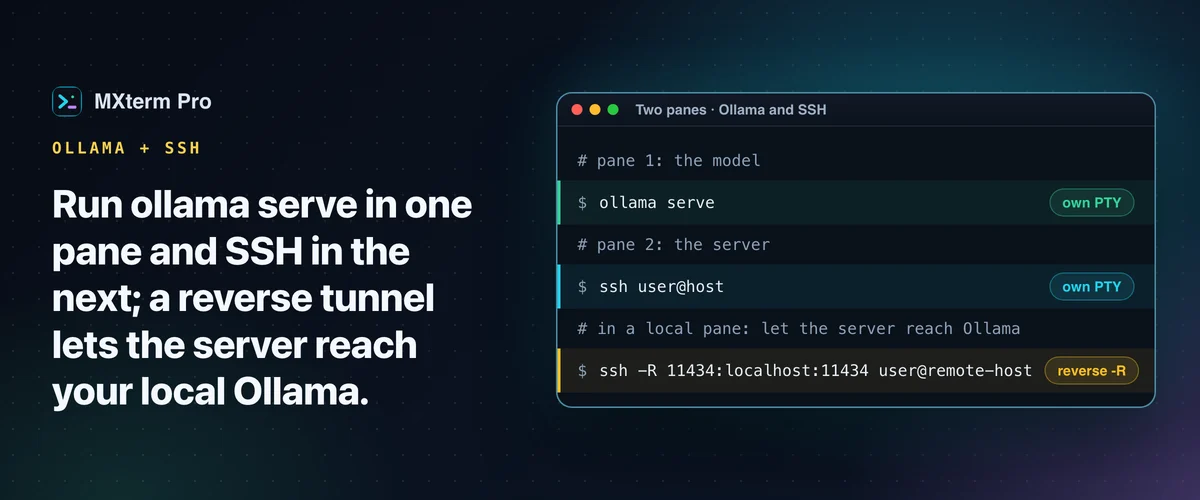
To run Ollama in a terminal alongside SSH, put ollama serve in one MXterm Pro pane and your SSH connection in the next. Both are independent PTYs in the same split-pane workspace. Switching from your model's output to a remote server's logs takes a click or a keyboard shortcut, not an app switch. The part that needs care is reaching Ollama across an SSH connection, which takes an SSH tunnel.
Split the Workspace: One Pane for Ollama, One for SSH
Open a workspace, split it into two panes and run ollama serve in one. For an interactive chat, use ollama run llama3 instead. To get SSH into the workspace, connect from SSH Manager (⇧⌘H), which opens its own tab, and split that tab for Ollama. Or type ssh user@host in a pane.
Both are real PTYs running as independent OS processes. Resizing one, focusing it or closing it doesn't touch the other.
Ollama's output is worth watching while you work on a remote server: model load progress, request logs, memory warnings. You don't need to alt-tab to another terminal app to check whether Ollama still responds or a model finished loading. It's the next pane over.
Related guideRunning Cursor Agent in a Multi-Pane Terminal on MacReaching Your Local Ollama Instance From a Remote Server
Ollama listens on 127.0.0.1:11434 by default, so it only accepts connections from the machine it runs on. Say a script on the remote box calls your Mac's Ollama API at /api/generate. Localhost on that remote server isn't your Mac's localhost, so without a tunnel the request fails.
Binding Ollama to OLLAMA_HOST=0.0.0.0 instead exposes an API with no authentication, so a tunnel is the safer default.
The fix is a standard reverse SSH tunnel, not anything MXterm Pro adds on top: ssh -R 11434:localhost:11434 user@remote-host. It forwards the remote server's port 11434 back to your Mac's Ollama instance. Then curl http://localhost:11434/api/generate run on the remote server reaches your local model.
The remote sshd must allow TCP forwarding, and the port binds to the remote host's loopback only. MXterm Pro's SSH tunnel manager only adds local (-L) forwards, so type this ssh command yourself in a local pane on your Mac. It's plain SSH port forwarding, so it works from any app you SSH from.
For the reverse case, Ollama running on a remote GPU box you want to query from your Mac, use a normal forward tunnel: ssh -L 11434:localhost:11434 user@gpu-host. Then curl http://localhost:11434/... run locally reaches the remote model.
RAM, GPU, and Resource Contention Between Panes
ollama ps lists the models currently loaded and how much memory each one holds, so it's a quick check from another pane. A loaded model stays in RAM until Ollama unloads it, by default five minutes after the last request. It stays in GPU memory too if it's using Metal or CUDA acceleration. OLLAMA_KEEP_ALIVE=10m ollama serve changes that window.
Resource contention is where panes can bite. MXterm Pro doesn't sandbox or cap what a pane's process can use, so a terminal pane is only as resource-hungry as the shell behind it.
Add a third pane running a coding agent that's compiling a large project, and all three panes draw from the same Mac's RAM, CPU and GPU. On a machine with limited memory, that shared ceiling is the practical limit, not anything about panes or SSH specifically.
If ollama serve refuses to start with an "address already in use" error, something is already bound to port 11434. Often that's a previous pane, or a separate Ollama menu-bar app if you have one installed. Run lsof -i :11434 to see what's holding it before you kill it or just reuse the running instance.
Adding Command Recipes and a Coding Agent to the Same Workspace
MXterm Pro's Command Recipes (Cmd+J) has nothing to do with whatever model Ollama is serving. It doesn't use a model at all, just a fixed set of ready-made Linux commands matched by keyword. There's no setting to point it at Ollama.
Here it's useful for a narrower reason, mostly in the pane that's SSHed into a Linux server. You can pull up a ready-made command without looking up flags: which processes use the most RAM, the last 50 lines of the system log, what's bound to port 11434. They're Linux commands, so the RAM and log recipes won't run as written in a local macOS pane. No recipe covers GPU memory.
If a coding agent (Claude Code, Codex, Cursor) is generating code that calls your local model's API, run it in a third pane. The agent, the model and the server you're deploying to all stay visible in one workspace.
Turning on Isolate features in git worktrees in the composer gives each agent pane its own checkout at <repo>/.worktrees/<slug> on its own branch, when the folder is a git repo. The option is off by default. It reduces the chance that two agents collide over the same files mid-edit.
What This Costs: Free vs Pro
None of this requires Pro. By default, MXterm Pro's free tier covers unlimited terminal panes, up to 5 saved SSH hosts and 1 saved Machine, with full SFTP GUI file management. An Ollama pane and an SSH pane are just two panes, and the Command Recipes popup uses none: nowhere near a limit for this specific workflow.
The cap becomes relevant once you're managing more than 5 remote hosts at once. Pro lifts the SSH host cap: unlimited saved SSH hosts.
iTerm2 + tmux, Warp, and SSH-Only Clients
iTerm2 already does real split panes, and plenty of developers run ollama serve in one iTerm2 pane and SSH in another. You can also keep Ollama alive inside a tmux session on a remote box so it survives an SSH disconnect. That setup is solid if split panes are all you need.
iTerm2 is mature, scriptable and free. Its Snippets feature re-sends strings you save yourself, while Command Recipes come as a ready-made set of Linux commands for the checks around that session. It also has no built-in way to isolate a second AI coding agent's working directory if you're running one against the same repo.
Warp has its own AI features and is organized around command blocks, so it is a different workflow, not a missing one. Termius and MobaXterm are strong, established SSH/SFTP clients with real saved-host management, a good fit if the SSH side is the whole job.
MXterm Pro puts Ollama, SSH and an agent pane in one workspace, with Command Recipes and per-agent worktrees.
Multi-pane SSH, Command Recipes (Cmd+J), and a multi-agent Control Room (formerly War Room): free to start.
Already have MXterm Pro? Read the setup guide →
New to MXterm Pro? See pricing →
Frequently Asked Questions
No. MXterm Pro doesn't talk to Ollama's API directly. It runs ollama like any other command in a terminal pane. The benefit is having that pane next to your SSH and agent panes, not a dedicated Ollama feature.
Open a reverse SSH tunnel: ssh -R 11434:localhost:11434 user@remote-host. That forwards the remote port 11434 back to your Mac, so curl http://localhost:11434/api/generate on the remote box reaches your local model. MXterm Pro's built-in forwarding is local (-L) only, so type it in the pane. The remote sshd has to allow TCP forwarding, and the port binds only to the remote host's loopback.
Not directly. SSH is network I/O, not compute, so an idle SSH pane doesn't take memory or GPU from a loaded Ollama model. All panes do share the same Mac's total RAM, CPU and GPU, since MXterm Pro doesn't sandbox pane processes. A heavy third pane, such as a coding agent compiling something, can still slow things down.
Something is already bound to port 11434, often a previous pane or a separate Ollama menu-bar app if you have one installed. Run lsof -i :11434 to see what's holding it. Then either reuse that instance or stop it before starting a new one.
Yes. Panes are independent. Closing an SSH session or an agent pane doesn't affect a separate pane running Ollama.