How to Prevent SSH Connection Timeouts on Your MacBook
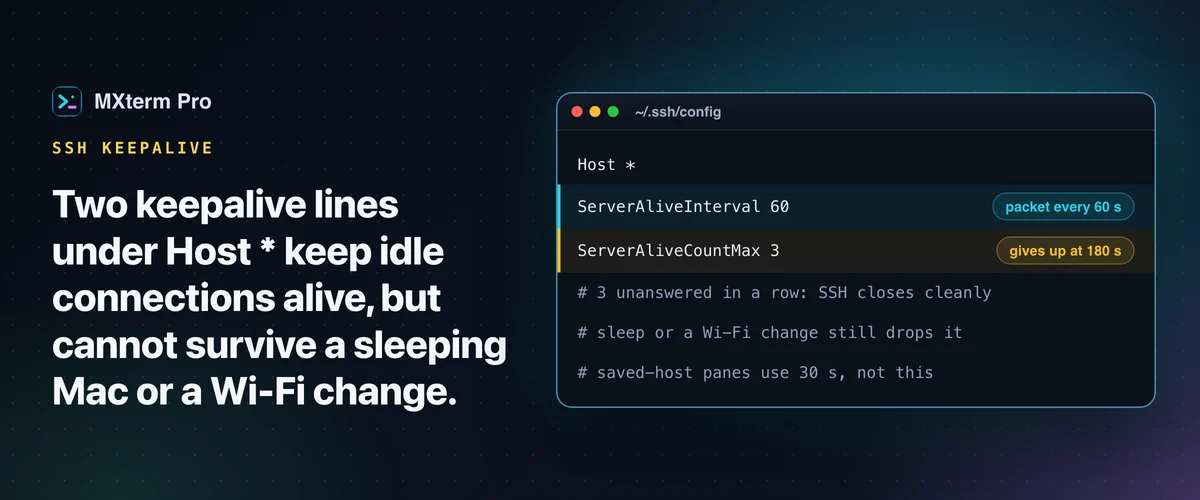
To prevent SSH connection timeouts on a MacBook, add ServerAliveInterval 60 and ServerAliveCountMax 3 under Host * in ~/.ssh/config. Your Mac's SSH client then sends a small keepalive packet before a Wi-Fi router, a corporate firewall or the remote server's idle timer closes the connection. It won't survive sleep or a Wi-Fi change, though. Below, you'll see which of the four timeouts you're hitting.
Set Global SSH Keepalive in ~/.ssh/config
Open (or create) ~/.ssh/config and add a Host * block with two directives: ServerAliveInterval 60 and ServerAliveCountMax 3. Terminal apps that run your shell, MXterm Pro included, use the ssh on your PATH, normally the OpenSSH that ships with macOS.
That client now sends a null "are you there" packet to the server every 60 seconds. If three in a row (180 seconds) go unanswered, SSH closes the connection cleanly instead of hanging on a dead socket.
Put your Host * catch-all at the bottom of the file. OpenSSH uses "first obtained value wins" for each option. If you already have specific Host blocks for individual servers (a jump host, a work VPN box with its own settings), a Host * block above them has already "claimed" ServerAliveInterval before the specific block is read.
A 60-second interval with 3 tries takes up to three minutes to notice a dead connection, a reasonable starting point. If a corporate firewall or public Wi-Fi prunes idle connections around the one-minute mark, drop to ServerAliveInterval 30 and ServerAliveCountMax 2. You detect a drop in a minute instead of three, at the cost of one extra tiny packet every 30 seconds.
To confirm it works, leave a session idle for longer than whatever used to disconnect it and check that it's still there. The FAQ below shows how to watch the keepalive packets themselves.
macOS's SSH client already has TCPKeepAlive yes on by default, but that's a TCP-level check that can take up to two hours to notice a truly dead socket. It does nothing against a firewall or NAT device that still forwards packets but has decided your idle connection is done. ServerAliveInterval works at the SSH protocol level instead, so it's the setting that fixes this.
Which Timeout You're Actually Hitting (and Why MacBooks Get Hit More)
Not every SSH disconnect has the same cause, and the right fix depends on which one you have.
Idle firewall or NAT timeout: something between you and the server (a corporate firewall, home router, VPN gateway) decides a connection with no traffic for a few minutes is dead and drops its state. ServerAliveInterval fixes this directly, as long as it's shorter than that device's timeout window.
Server-side idle timeout: the remote sshd is configured to hang up idle clients, or a login shell has its own TMOUT. Your local ServerAliveInterval helps with the sshd case, since your client no longer looks idle from the server's side.
Network change: switching Wi-Fi networks, joining a VPN, or moving between home and a hotspot changes your IP mid-session. SSH's TCP connection can't survive that, and no keepalive setting fixes an IP change. Only a protocol built for it (Mosh) can, and it trades some terminal features for the resilience.
Sleep: the MacBook-specific one. When the lid closes or the Mac sleeps, it stops running your SSH client, so no keepalive packets go out during that gap. On wake, the server has often given up on the connection and SSH reports a timeout or broken pipe.
If a session must survive the lid closing, run the remote job inside tmux/screen so the job doesn't care that your local connection dropped (more on that in the FAQ).
Fix It Server-Side Too, If You Can
If you manage the remote box, you can prevent SSH connection timeouts from that side too. Add ClientAliveInterval 60 and ClientAliveCountMax 3 to /etc/ssh/sshd_config and restart sshd. It's the server's mirror of the client setting, and it stops the server from being the one that hangs up on you.
If you don't control the server (a shared host, a client's VM, a cloud box someone else manages), you're not stuck. ServerAliveInterval in your own ~/.ssh/config works independently, since your client sends the keepalive traffic and the remote sshd doesn't have to cooperate.
What Actually Happens Inside MXterm Pro When a Session Times Out
Every terminal pane in MXterm Pro is a real PTY running your normal login shell, built on Tauri with portable-pty in Rust. It isn't a browser tab standing in for a terminal.
An SSH connection you open inside it uses the same OpenSSH client your Mac already has. In a plain pane, ssh reads your ~/.ssh/config exactly as it does in Terminal.app or iTerm2, so the keepalive lines in this guide apply unchanged.
A pane opened from a saved host is different. MXterm Pro starts ssh with -o ServerAliveInterval=30 -o ServerAliveCountMax=3 on the command line, so it notices a dead connection in about 90 seconds. OpenSSH takes the first value it obtains, and command-line options come before the config file. Your ~/.ssh/config values for those two options therefore do not apply to that pane.
What you see when a session drops depends on how you opened it. Type ssh yourself into a plain pane and ssh is the process that exits, not the shell underneath. You land back on your Mac's own local prompt in the same pane, with everything already printed still on screen. Reconnect by retyping the command or pressing ↑.
A pane opened from a saved host behaves differently. It spawns ssh directly, so there is no shell to fall back to. For the 255 that a dropped session usually exits with, the pane prints its own dim line that starts SSH connection failed or dropped (exit 255) and ends press Enter to reconnect. Enter opens the connection again.
For any other exit code, the pane prints Disconnected (exit N) followed by press Enter to reconnect.
The SSH Host Manager (⌘⇧H) helps around the edges of a drop rather than during one. Connecting through a saved host reuses OpenSSH's own connection multiplexing (ControlMaster=auto, ControlPersist=10m). Opening the SFTP file panel for a host you're already connected to then reuses that connection and skips the handshake. The shared connection stays open for 10 minutes after the last session on it closes. More on saved hosts is in the SSH and SFTP docs.
The shared connection closes sooner if you change the saved host's connection settings or delete the host, and the file panel has a Reset connection button for a server that refuses the login or forces a password change.
One tier note for anyone juggling more than a couple of servers: by default the free tier saves up to 5 SSH hosts in that manager, and the paid Pro tier removes that cap.
MXterm Pro vs iTerm2, Warp, Termius, and MobaXterm for Long SSH Sessions
Termius supports Mosh, which survives IP changes and sleep/wake in a way plain SSH structurally can't. For a fuller comparison see best SSH clients for Mac.
MXterm Pro runs several SSH sessions plus AI coding agents (Claude Code, Codex, Gemini CLI) side by side in one workspace. With worktree isolation ticked in the new-tab composer (off by default, git repos only), each agent pane gets its own git worktree, which reduces the chance that one agent's changes collide with another's. It doesn't replace the keepalive settings above, so set them whichever terminal app you use.
Multi-pane SSH, Command Recipes (Cmd+J), and a multi-agent Control Room (formerly War Room): free to start.
Already have MXterm Pro? Read the setup guide →
New to MXterm Pro? See pricing →
Frequently Asked Questions
ServerAliveInterval is a client-side setting in your Mac's own ~/.ssh/config. It tells your machine to ping the server. ClientAliveInterval is the server-side mirror, set in /etc/ssh/sshd_config on the remote machine. It tells the server to ping your client. You only need one side for keepalives to work. Setting both is harmless, and useful when you are not sure which end is timing out.
Yes, for anything that has to survive an actual disconnect, not just an idle timeout. ServerAliveInterval only stops a connection from being killed for looking idle. It can't save a job if your MacBook sleeps, your Wi-Fi drops or you close the lid. A build or migration inside tmux or screen on the remote server keeps going whatever your local connection does. Reattach with tmux attach once you're back online.
Usually because the MacBook went to sleep, not because the keepalive failed. A sleeping Mac runs no SSH client, so no keepalive packet goes out. SSH reports the drop the moment you wake up.
The simplest check is to leave a session idle for longer than whatever used to disconnect it and confirm it's still there. To see the packets themselves, run sudo tcpdump -i en0 host <server-ip> and port 22 in a second window. Watch for small packets going out every ServerAliveInterval seconds, even while the session is idle. A pane opened from a saved host sends them every 30 seconds instead.