Isolating Parallel AI Agents with Git Worktrees
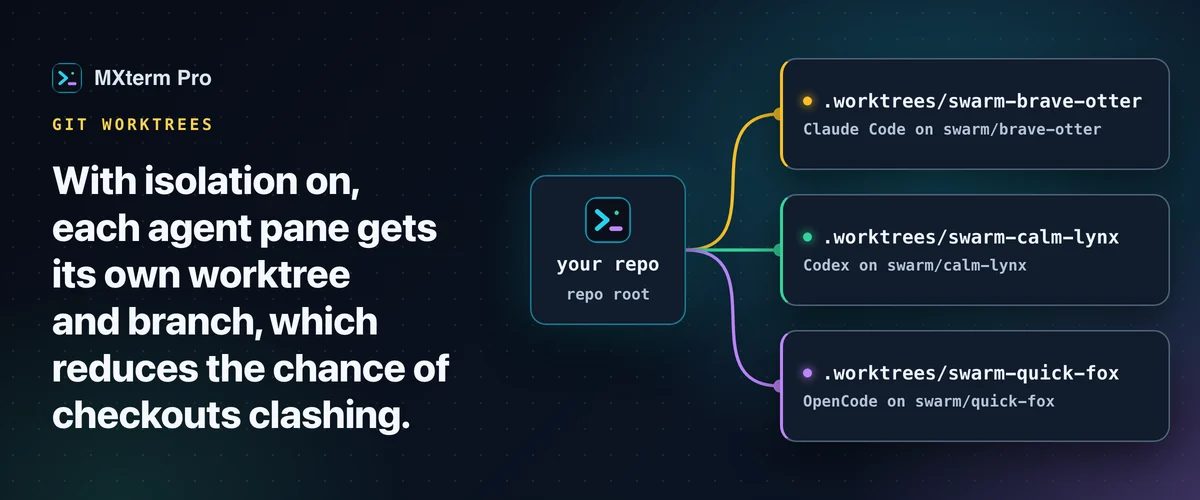
A git worktree per AI agent gives each coding agent in a repository (Claude Code, Codex, OpenCode) its own branch and files. MXterm Pro automates this: tick worktree isolation when you create a workspace, and each agent pane opens in its own worktree on a fresh branch, with no manual git worktree add. Without it, one agent's git checkout or git stash can rewrite files another is editing.
Who Actually Needs Worktree-Per-Agent Isolation
A single agent alone in a repository has nothing to collide with. The main working directory is enough, and turning on isolation buys you nothing.
Isolation matters once you run two or more agents against the same repository at the same time. MXterm Pro's Swarm Task Orchestrator ships two presets built for that. "Full Swarm Trio (Lead, QA, Docs)" dispatches Claude Code, Codex and OpenCode together. "Feature Duo (Dev + Tester)" pairs Claude Code with Codex. Both turn worktree isolation on by default when you launch them.
You don't need a preset. Open a new tab, choose the agents, and tick "Isolate features in git worktrees" in the composer yourself. The box is off by default and works only in a git repository. Panes you split off afterwards open in the workspace folder, not in a worktree of their own.
Related guideDocker Build Terminal on Mac: Builds Alongside SSH DeploysHow MXterm Pro Provisions a Worktree for Every Agent Pane
The toggle appears in two places that do the same thing: the New Workspace screen ("Isolate features in git worktrees") and the Swarm Task Orchestrator dialog ("Isolate features in Git Worktrees"), which you see when you dispatch a preset. The agents and Control Room (formerly War Room) docs describe the same setting.
When it's on, each new agent pane gets its own checkout inside the repo's .worktrees/ directory. The branch is freshly generated and named swarm/<adjective>-<noun>, for example swarm/brave-otter. A plain terminal pane with no agent attached still opens at the repo root, untouched.
The name is picked at random from a pool of roughly 17,000 combinations, not a numbered scheme, so two runs never reuse a stale worktree by coincidence. If the name is already taken, MXterm retries with a numeric suffix (swarm/brave-otter-2, then -3 and so on), trying at most five names in all before giving up on that pane.
MXterm adds the .worktrees/ directory to the repo's own .gitignore automatically the first time it creates it. These throwaway checkouts never show up as untracked changes in your main working tree.
If the folder you point MXterm at isn't a git repository, isolation is skipped rather than forced. Up to 1.0.21 the app ran git init, git add . and a commit on such folders, which could sweep a .env or a private key into a history nobody asked for. Since 1.0.22 it no longer runs git init on them.
The composer now says "This folder isn't a git repository, so agents will share it directly (no worktree isolation)". The panes open unisolated at the folder root, and each carries a dismissible notice saying why. Run git init and make your own first commit if you want the isolation.
One exception: in an existing repository with no commits, the New Workspace composer and the Swarm Task Orchestrator dialog create an empty .gitkeep and commit only that file as "Initial commit" before making worktrees (other files already in the folder are not staged), because a worktree needs a commit to branch from.
Each pane's header shows its worktree's branch name as a small badge. You can tell which branch an agent is sitting on without opening the git panel.
Provisioning happens serially, on purpose. Concurrent git worktree add calls on one repo contend for git's lock file, and a transient failure would burn a pane's isolation. If a worktree can't be created (a git lock error, no disk space, any other cause, after name clashes have been retried), that one pane falls back to the repo root and logs a warning. The rest of the workspace still opens.
What Isolation Actually Prevents (and What It Doesn't)
Take the concrete case: dispatch "Feature Duo" and Claude Code lands on its own branch and worktree, Codex on another.
Without isolation, both agents would share one working directory. If Codex runs git checkout or git stash mid-task, the files Claude Code has open on disk change under it. Neither agent's next tool call knows why the file it just wrote doesn't match what it reads back.
With separate worktrees, each agent has its own copy of every file, checked out to its own branch. This reduces the chance that one agent's checkout rewrites the files another agent has open.
Isolation doesn't remove every kind of conflict. Two agents editing the same feature from different angles can still produce branches that need a real, human-reviewed merge later, and MXterm doesn't automate that part. What isolation removes is narrower and purely mechanical: the filesystem-level fight over one shared working directory.
A worktree is not a sandbox. The pane is still a normal shell, so an agent can leave its folder and run any command your user can. Every worktree also shares the one .git behind the repository. Isolation keeps the agents' files apart; it does not limit what they can do.
Adding, Merging, and Removing Worktrees Mid-Session
Isolation isn't decided only at workspace creation. An agent can spawn a new isolated worker pane mid-session for a delegated sub-task, using the worktree.spawn tool. This works only in a workspace created with worktree isolation on.
Merging stays manual on purpose. Once an agent's branch is ready, merge it the normal way: git merge swarm/brave-otter from the main worktree, or push it and open a pull request, whichever your team already does. MXterm's job stops at creating and later cleaning up the worktree. It doesn't decide what happens to the code inside it.
Removal is deliberately conservative, and two callers use two separate paths. An agent can only remove a worktree that has zero uncommitted changes. It refuses outright otherwise, with no override.
Clearing one from the UI works differently. "Clean up worktrees…" sits next to the Git panel's worktree list. It prunes stale entries (a worktree whose directory is gone) with no confirmation, then opens a dialog.
In the dialog, worktrees with uncommitted files are listed by branch with the number of files each has. They are unchecked by default, so you tick each one you want removed. Worktrees with nothing uncommitted are only summarized as a count and are removed when you confirm.
The dialog only counts commits ahead of a branch's upstream, and the branches MXterm creates have no upstream, so for them it counts none. Check a branch's commits yourself before you confirm, because removal deletes the branch with git branch -D.
Neither path runs automatically. Closing a pane, a workspace or the whole app never deletes a worktree on its own. Cleanup only happens when you, or an agent working within its own strict limits, do it on purpose.
One constraint to know upfront: a worktree's directory is never renamed after creation, because an agent's session state is tied to that absolute path. You can rename the git branch inside it freely, but not the folder.
Free vs Pro: What's Actually Gated
Worktree isolation isn't a Pro-only toggle. It works the same way on both tiers.
What's gated is the size of a Control Room. By default Free has no pane limit, but it caps any single Control Room (agents grouped for shared cross-agent context) at 2 members. Other Free caps, 5 saved SSH hosts and 1 saved Machine, are unrelated to worktrees. Pro lifts these caps.
The "Feature Duo" preset (2 agents, 2 worktrees) fits comfortably inside Free's 2-member Control Room limit. "Full Swarm Trio" has three agents, so a Control Room with all three needs Pro.
Git Worktrees vs. iTerm2, Warp, Termius, and MobaXterm
The free alternative to MXterm's automation isn't a different app. It's a git worktree per AI agent set up by hand, with plain git worktree add and git worktree remove commands in whatever terminal you already use. That works fine for one or two agents.
What MXterm Pro removes is the bookkeeping as the number of agents grows: planning a unique branch name, provisioning the worktree, wiring the pane's working directory to it and refusing to delete one with uncommitted work by mistake.
iTerm2 is an excellent, deeply scriptable macOS terminal emulator. Like other plain terminals, it doesn't provision git worktrees for you. Running this workflow there means typing git worktree add by hand for every pane, then remembering to git worktree remove and delete the branch yourself later.
Warp also puts an AI agent front and center in the terminal. It can run several agents at once in separate tabs or panes, and its own multi-agent guide recommends one git worktree per agent (see MXterm Pro vs Warp). MXterm Pro's angle is narrower: with isolation on, it provisions the branch and worktree for each agent pane itself.
Multi-pane SSH, Command Recipes (Cmd+J), and a multi-agent Control Room (formerly War Room): free to start.
Already have MXterm Pro? Read the setup guide →
New to MXterm Pro? See pricing →
Frequently Asked Questions
No. MXterm Pro plans the branch name and runs the worktree add/remove commands for you whenever isolation is on. Typing them yourself is optional.
Nothing. Closing a pane, a workspace or even quitting MXterm Pro never removes a worktree. You clean one up explicitly, in one of two ways. An agent's own tool call works only when the worktree is fully clean. Or use "Clean up worktrees…" next to the Git panel's worktree list once you're done with the branch.
Some, but far less than a full second clone. A git worktree shares the repository's commit history and objects through the same underlying .git. Only the checked-out files and a small amount of per-worktree metadata are duplicated. So the overhead scales with your working tree's size, not your repo's whole history.
MXterm Pro doesn't merge branches for you, on purpose. Once an agent's swarm/<name> branch is ready, merge it the normal way from your main worktree (git merge swarm/brave-otter) or push it and open a pull request, whichever your team already does.
Isolation is skipped and the panes open sharing that folder directly, with a notice on each explaining why. MXterm Pro doesn't run git init on it. Run git init and make your own first commit, then create the workspace again.